

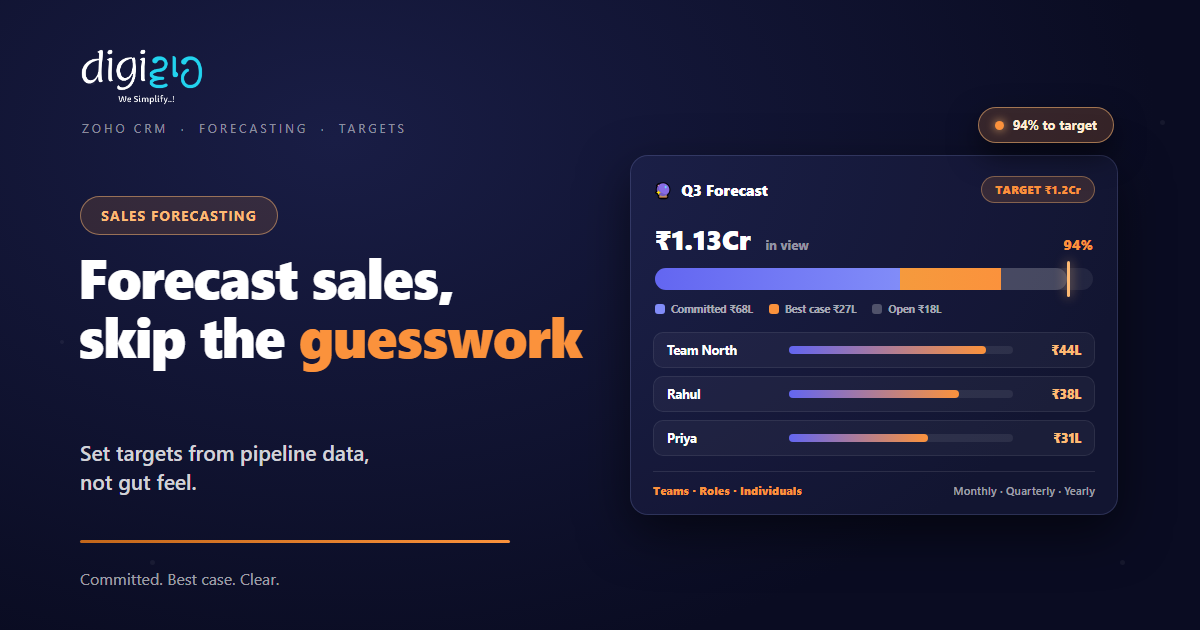
Zoho CRM Sales Forecasting: Set Targets, Skip the Guesswork
Your pipeline already knows how the quarter is going. So build the forecast from data, not from gut feel.
Last Updated: July 9, 2026
A sales forecast is your best estimate of what the team will close in a period. So forecasting in Zoho CRM turns pipeline data into targets and tracks progress against them. Deals are grouped as Committed, Best Case, or Open. As a result, “will we hit the number?” gets an answer in July, not a surprise in September.
This matters because most small firms forecast by feel. But feelings swing with the last phone call. So stock gets ordered for a quarter that never comes, or hiring waits for one that was already here. In fact, a forecast is less about prediction and more about planning.
Key Takeaways
- Data, not vibes. Forecasts draw on the pipeline, past results, and team performance.
- Three buckets. Deals sit as Committed, Best Case, or Open — so confidence is visible.
- Two views. Top-down across the company, or bottom-up by team, role, or person.
- Flexible targets. Quotas can be redefined when market conditions change.
- Any period. Forecast monthly, quarterly, or annually — even per pipeline.
Table of Contents
- What Is Sales Forecasting in Zoho CRM?
- Why Gut-Feel Forecasts Fail
- Built From Real Pipeline Data
- Committed, Best Case, Open
- Top-Down and Bottom-Up Views
- Targets That Move With the Market
- Gut Feel vs CRM Forecast
- How to Set Up Forecasting in Zoho CRM
- A Forecast in Action
- Frequently Asked Questions
- Conclusion
What Is Sales Forecasting in Zoho CRM?
Forecasting sets a target and then measures the pipeline against it. So you define the number — say ₹1.2Cr for the quarter. Then Zoho CRM shows how much revenue is in view, and how solid each rupee is.
The engine behind it is your own history. As Zoho’s forecasting page puts it, the system looks at “opportunities in the pipeline, historical data, and team performance to lock in on realistic targets.” Because it all lives inside Zoho CRM, the forecast updates as deals move.
Why Gut-Feel Forecasts Fail
Every owner carries a number in their head. The trouble is where that number comes from. Usually, it is last month plus hope. So it swells after a good meeting and shrinks after a bad week.
Decisions ride on that number. For example, inventory, hiring, and cash planning all lean on expected sales. But a moody forecast makes moody plans. Meanwhile, the reps each carry their own private version, and nobody reconciles them.
A CRM forecast replaces the mood with a method. Because every deal has a stage, a value, and a close date, the math is already sitting in your pipeline. So the forecast simply reads what the team already recorded.
Built From Real Pipeline Data
A useful forecast rests on three inputs, and Zoho CRM uses all of them. First, the live pipeline — what is open right now, and at which stage. Second, historical data — what actually closed in past periods. Third, team performance — who tends to deliver against their number.
Together, these keep the target honest. So a ₹2Cr wish gets tested against ₹80L of open pipeline, and reality wins. In short, the forecast connects ambition to evidence.
This is also why pipeline hygiene matters. After all, the forecast reads deal values and close dates. So stale deals and missing amounts bend the number. Clean pipeline in, credible forecast out.
Committed, Best Case, Open
Not every open deal deserves equal faith. So Zoho CRM sorts forecast revenue into three buckets, and the difference between them is confidence.
Committed
Deals the team is confident will close this period. So this is the floor you can plan cash and stock against.
Best Case
Deals that can close if things go right. So this is the stretch — worth chasing, not worth banking on.
Open Deals
Everything else still in play. So these feed next period, or surprise you in this one.
The Target
The quota the buckets are measured against. So the gap between Committed and target is your week’s agenda.
Read together, the buckets prioritize high-impact revenue. For example, Committed ₹68L against a ₹1.2Cr target says exactly how much Best Case must convert. So the Monday meeting writes itself.
Top-Down and Bottom-Up Views
A forecast should answer the owner and the rep in the same breath. So Zoho CRM gives two angles on one number.
The top-down view follows your structure. In Zoho’s words, “a top-down hierarchical view offers clarity across your business structure.” So the company number splits into regions, then teams, then people. Meanwhile, the bottom-up view “focuses on teams, roles, or individuals” — each rep sees their own target and their own gap.
There is flexibility in the slicing too. Forecasts can be built for teams or individuals, with conditions based on specific pipelines, across monthly, quarterly, or annual periods. So a fast-moving products pipeline can carry a monthly number, while projects run quarterly.
Targets That Move With the Market
Markets shift mid-quarter. A festival season lands early, or a big client freezes spending. So a quota carved in stone becomes fiction by week six.
Zoho CRM keeps quotas alive instead. You can “redefine targets on the basis of changing market conditions or sales realities to align goals with performance.” So the number stays demanding, but stays believable. As a result, the team keeps pushing instead of quietly giving up on it.
One more useful turn: revenue is not the only thing you can track. Forecasts can monitor deal revenue, product quantities, or licenses sold. For example, a distributor can target units moved, not just rupees booked.
Gut Feel vs CRM Forecast
Both produce a number for the quarter. But they behave very differently when reality pushes back. So here is the side-by-side.
| Question | Gut-Feel Forecast | Zoho CRM Forecast |
|---|---|---|
| Where does the number come from? | Last month plus hope | Pipeline, history, performance |
| How confident is it? | One fuzzy figure | Committed vs Best Case vs Open |
| Who owns which part? | Unclear until month-end | Targets by team, role, or person |
| Market shifts mid-quarter? | Number quietly ignored | Quota redefined, tracking continues |
| Progress check | Ask everyone, average the answers | Live gap to target, per pipeline |
So the difference is not accuracy alone. It is that a CRM forecast stays useful after week one.
How to Set Up Forecasting in Zoho CRM
Setup is quick once the pipeline is in shape. So here is the path from wish to working forecast.
-
1Clean the pipeline first
First, make sure every open deal has a value, stage, and close date. The forecast reads these. -
2Pick the period and pipeline
Next, choose monthly, quarterly, or annual — and set conditions per pipeline if motions differ. -
3Set targets down the hierarchy
Then assign quotas top-down — company to teams to individuals — so every number has an owner. -
4Categorize the open deals
Now mark deals as Committed or Best Case honestly. The buckets only work if they mean something. -
5Review the gap weekly
Finally, track Committed against target each week, and adjust quotas when the market truly moves.
Forecast review in one question: what must move from Best Case to Committed this week — and what will we do about it?
A Forecast in Action
The mechanics are simple. So here is the difference they make in a real quarter.
The owner set quarterly targets on instinct, and the team learned to nod and ignore them. Stock was ordered for a big Q2 that never arrived. Then they set up forecasting in Zoho CRM. Now a ₹1.2Cr quarterly target splits across two teams and five reps. The dashboard shows ₹68L Committed and ₹27L Best Case, so the gap is visible in week two, not week twelve. As a result, purchasing follows the Committed number, and the quarter-end scramble is gone.
Nothing about their market changed. Instead, the number became shared, visible, and honest. So everyone worked the same gap, early.
Frequently Asked Questions
What is sales forecasting in Zoho CRM?
It is setting revenue targets and tracking live pipeline against them. Zoho CRM builds the forecast from opportunities in the pipeline, historical data, and team performance, so targets stay realistic.
What data does the forecast use?
Three inputs: the open pipeline (deal values, stages, close dates), historical results from past periods, and team performance. That is why clean pipeline data directly improves forecast quality.
What do Committed and Best Case mean?
Committed deals are ones the team is confident will close in the period — the floor you can plan against. Best Case deals can close if things go right. Open Deals are everything else still in play.
Can I forecast by team or individual?
Yes. Forecasts work top-down across your hierarchy and bottom-up for teams, roles, or individuals. You can also set conditions per pipeline and run periods monthly, quarterly, or annually.
Can targets change mid-quarter?
Yes. You can redefine targets when market conditions or sales realities change, so goals stay aligned with performance. The tracking continues against the updated quota.
Can I forecast things other than revenue?
Yes. Zoho CRM forecasts can track deal revenue, product quantities, or licenses sold. Forecasting is part of Zoho CRM’s sales automation, alongside pipelines and workflows.
Conclusion
In the end, a forecast is a plan wearing numbers. So build it from the pipeline your team already maintains, and split it into Committed, Best Case, and Open. After all, the point is not predicting the future perfectly. Instead, it is knowing the gap early enough to act on it.
Start this quarter. First, clean your open deals — values, stages, dates. Then set one target and split it by team. Next, review the gap every Monday. Within one quarter, purchasing, hiring, and cash planning all get calmer.
Be honest: is your current quarterly number a forecast, or a hope?
Want targets and forecasts set up on a pipeline your team actually maintains? Talk to a Zoho Authorized Partner.
