Zoho Analytics — Live Business Dashboards for Indian SMEs
Your data is already in Zoho. Zoho Analytics makes it visible in one place — no exports, no formulas, no waiting.
Published: March 24, 2026
If someone asked you right now — "How many leads did you get last month?" — could you answer in 30 seconds? For most Indian SMEs not using Zoho Analytics, the honest answer is no.
Most business owners cannot. Not because the data does not exist. It does — in Zoho CRM, in Zoho Books, in Zoho Desk. But it is scattered across three different apps. Getting to an answer means opening each one, running a report, and manually piecing the numbers together.
Zoho Analytics fixes this. It connects all your Zoho apps into one live dashboard — so revenue, leads, tickets, and team performance are always visible, always current, and always in one place.
Table of Contents
The Problem With Scattered Business Data
When your data lives in separate apps, every business question costs time. Your sales manager opens CRM to check leads. Your accounts team opens Books to check revenue. Your support head opens Desk to check ticket trends. Nobody has the full picture. Nobody can see patterns across all three.
These are the questions no one can answer in under 30 seconds when data is scattered:
- "How are leads converting to revenue this month?" — requires CRM + Books data
- "Which support issues are causing deal delays?" — requires Desk + CRM data
- "Is the sales team performing relative to our revenue targets?" — requires CRM + Books side by side
None of these are hard questions. But without a connected analytics layer, each one costs 10–20 minutes of manual data hunting every single time someone asks.
What Is Zoho Analytics?
Zoho Analytics is a business intelligence tool built into the Zoho ecosystem. It connects directly to your Zoho apps — CRM, Books, Desk, Projects, and more — and creates live dashboards that update automatically as your data changes.
No manual exports. No spreadsheet formulas. No waiting for someone to "pull a report." You open your dashboard and the current numbers are already there.
What Zoho Analytics Tracks
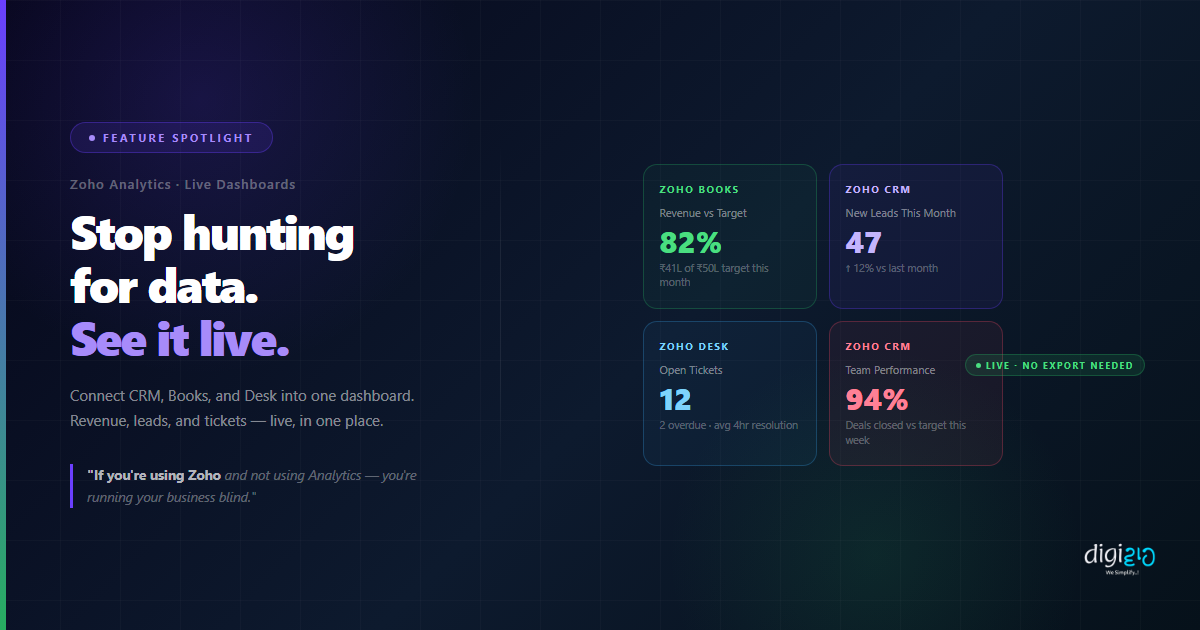
Zoho Analytics pulls live data from your connected apps and makes it visible in one unified dashboard. Here is what it tracks out of the box for Indian SMEs:
Revenue vs Target — Zoho Books
Live revenue figures against your monthly or quarterly targets — updated in real time as invoices are raised and payments come in. No spreadsheet. No export. Just open and read.
Lead Count and Source — Zoho CRM
How many new leads came in, where they came from — website, WhatsApp, referral, social — and what their conversion rates are by week, month, or custom date range.
Support Ticket Trends — Zoho Desk
Volume of incoming tickets, average resolution time, overdue tickets, and agent performance — all in one view. See which issues are recurring and which team members are falling behind.
Sales Team Performance — Zoho CRM
Individual rep performance — calls made, deals closed, pipeline value — compared side by side. No one has to send a spreadsheet. The numbers update the moment a deal moves in CRM.
The difference is immediacy. Instead of running these reports manually every week, the dashboard is ready every time you open it. A weekly review that used to take 20 minutes of data hunting now takes under 2 minutes to read.
How to Set Up Zoho Analytics
Connecting Zoho Analytics to your existing apps takes about 15 minutes. No developer needed — it is a no-code setup.
-
1Open Zoho Analytics Log in to your Zoho account and navigate to analytics.zoho.com, or find Zoho Analytics in your Zoho One app list. Click "Get Started."
-
2Create a New Workspace Click "New Workspace." Name it something descriptive — for example, "Business Overview" or "Sales & Finance." This is your dashboard container.
-
3Add Your Zoho Data Sources Click "Add Data Source" and select the Zoho apps you want to connect — Zoho CRM, Zoho Books, Zoho Desk, or others. Zoho Analytics syncs directly with your live data — no export needed.
-
4Select the Modules to Track Choose which data tables to import — for example, Leads and Deals from CRM, Invoices from Books, Tickets from Desk. Zoho Analytics pulls these into your workspace and keeps them in sync automatically.
-
5Use Auto-Generated Reports or Build Custom Charts Zoho Analytics suggests reports automatically based on your data. Use them out of the box, or build custom charts — bar, line, pie, funnel — using a drag-and-drop builder. No formulas, no coding.
-
6Build Your Dashboard Add your chosen reports to a dashboard in the layout you prefer. Group metrics by theme — Sales Overview, Finance Summary, Support Health — or create one unified Business Dashboard.
-
7Share With Your Team or Schedule Email Reports Share the dashboard with specific team members, or set up an automated email report — weekly or monthly — so your leadership team receives the summary without logging in.
Setup time: 15 minutes. Weekly time saved: 20 minutes of data hunting — permanently gone.
Manual Reports vs Zoho Analytics
| Manual Reports Every Week | Zoho Analytics |
|---|---|
| Export data from CRM, Books, Desk separately | All data connected and synced automatically |
| Paste into spreadsheet, build formulas manually | Live charts and dashboards — no formulas needed |
| Numbers are already outdated by meeting time | Dashboard updates in real time as data changes |
| Someone has to "pull the report" every week | Open dashboard — data is always ready |
| No cross-app view — see CRM or Books, not both | Revenue, leads, and tickets in one unified view |
| 20 minutes of data prep every Monday morning | Weekly review starts in under 2 minutes |
For businesses already using Zoho, Zoho Analytics is the missing layer that makes your existing data useful. The data is already there — in your Zoho CRM leads, in your Books invoices, in your Desk tickets. Zoho Analytics just surfaces it in one place, live. Combine this with WhatsApp Business API and you can push dashboard alerts to your phone automatically — for example, when support tickets spike or when a revenue target is at risk. See how Indian SMEs are building this kind of connected system in our case studies.
Frequently Asked Questions
What is Zoho Analytics?
Zoho Analytics is a business intelligence tool that connects your Zoho apps — CRM, Books, Desk, and others — into live dashboards. It shows you revenue, lead counts, ticket trends, and team performance in one place, updated automatically as your data changes — with no manual exports or spreadsheets.
Does Zoho Analytics work with all Zoho apps?
Yes. Zoho Analytics connects natively with Zoho CRM, Zoho Books, Zoho Desk, Zoho Projects, Zoho Inventory, Zoho Recruit, and more. You can also connect external sources such as Google Sheets, MySQL databases, and third-party apps via connectors.
Is Zoho Analytics real-time?
Zoho Analytics syncs your data at scheduled intervals — typically every few hours for most plans. The data is always current without manual action from your team. For businesses that need instant sync, higher-tier plans offer more frequent refresh rates.
Do I need a developer or data analyst to use Zoho Analytics?
No. Zoho Analytics uses a drag-and-drop chart builder and auto-generates suggested reports when you connect a data source. Most setups take 15–20 minutes with no technical skills required. No code, no SQL, no formulas.
Is Zoho Analytics included in Zoho One?
Yes. Zoho Analytics is included as part of the Zoho One suite. If you are on a Zoho One plan, you already have access — you just need to activate it and connect your data sources. Standalone Zoho Analytics plans are also available if you use only specific Zoho apps.
Conclusion
If your business runs on Zoho — CRM for leads, Books for invoices, Desk for support — then all the data you need to make decisions already exists. The only problem is that it is in three separate places, and getting it together costs 20 minutes every time someone asks a simple question.
Zoho Analytics removes that friction permanently. Connect your apps once. Get a live dashboard that is always ready. Revenue, leads, tickets, team performance — visible in one place, updated in real time, no spreadsheets involved.
The weekly review that used to start with 20 minutes of data hunting now starts the moment you open your dashboard. That is not a small improvement. It is a permanent change to how your business runs.
If you're using Zoho and not using Analytics — you're running your business blind.
Want to connect your Zoho apps into a live business dashboard — set up in one session?
📅 Schedule a Free Consultation 📥 Download Free eBook