3 Hours a Day. Copy. Paste. Repeat.
Most teams don't realise how much time they waste moving data between apps — until someone adds it up.
Published: March 24, 2026
If your team is copying customer details from WhatsApp into a spreadsheet, then re-entering the same details into your CRM, and again into your invoice tool — you already know the problem. Automate data entry once, and this cycle stops permanently. Most Indian SMEs don't realise they're stuck in it until someone counts the hours.
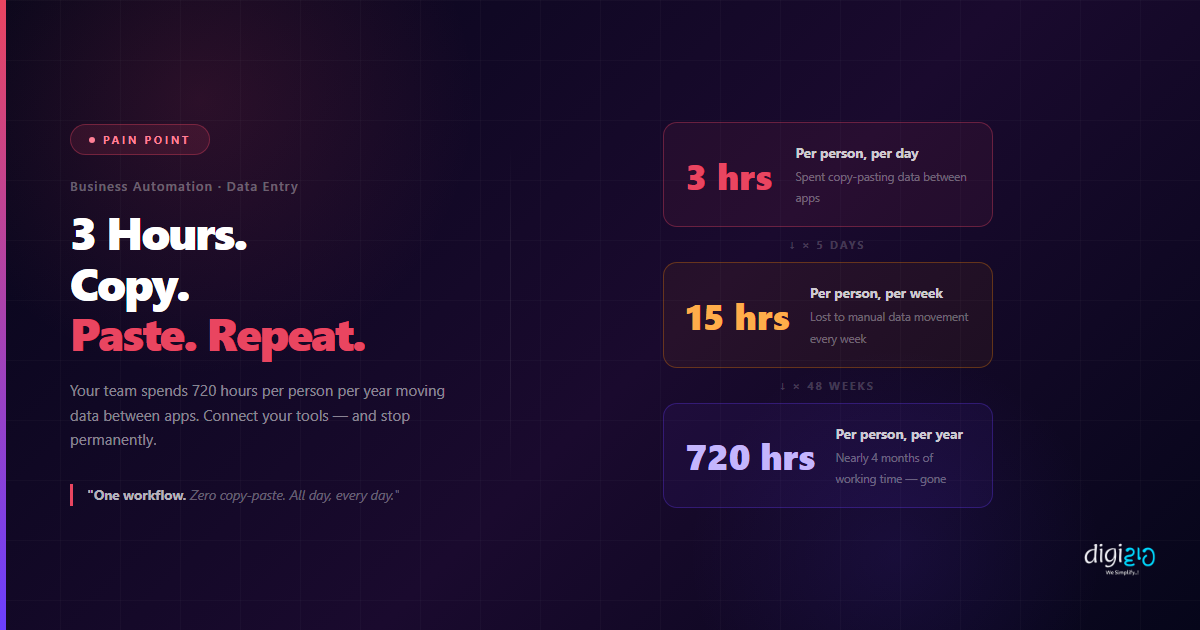
When business owners actually add up the time, the number is almost always the same: 2 to 3 hours per person, per day, spent manually moving data from one place to another.
That is not a people problem. Your team is not slow. It is a systems problem — five apps that do not talk to each other, so a human has to do the talking for them.
Table of Contents
The Hidden Cost of Copy-Pasting
The reason copy-pasting is so costly is that nobody notices it happening. It is not one big task that shows up on a to-do list. It is fifty small tasks — a minute here, two minutes there — spread across the entire day, across every person on your team.
The frustrating part: none of this data needed to be re-entered. It existed in one place already. The systems just were not connected.
Where Copy-Pasting Happens Most
In most Indian SMEs, manual data entry clusters around three main areas:
Lead Management
WhatsApp enquiries, website form submissions, and social media leads manually copied into CRM or spreadsheets — one by one, multiple times per day.
Invoicing and Accounts
Quotes approved in one tool re-entered into accounting software. Invoice details typed again into a spreadsheet for tracking. Same numbers, three places.
Customer Communication
WhatsApp conversations and email replies manually summarised and pasted into CRM notes. No record is automatic — someone has to do it every time.
Reporting
Sales numbers pulled from CRM, revenue from accounting software, and support tickets from a third app — pasted into a spreadsheet every week to build a report.
Every one of these is a workflow problem, not a team problem. Each one has a direct automation fix.
What It's Actually Costing You
For a team of five, that is 3,600 hours per year — spent moving data between apps that should be talking to each other automatically.
The cost is not just time. Every manual step is also a chance for error. A phone number transposed. A deal stage not updated. An invoice sent to the wrong amount. When humans are the connectors between systems, mistakes are not occasional — they are guaranteed.
How to Fix It: Connect Your Apps
The solution is not to work faster. It is to stop doing the work entirely by connecting your apps so data flows automatically from one to the next.
Here is what a connected workflow looks like, compared to the manual version:
Example 1: Lead from Website Form
-
1Customer fills a form on your website Using Zoho CRM Web Forms, the form is built inside CRM and embedded on your site — no third-party tool needed.
-
2Lead is auto-created in Zoho CRM The moment the form is submitted, a new lead record appears in CRM — name, email, phone, query — all filled in automatically.
-
3Lead is assigned to a sales rep A workflow rule assigns the lead to the right rep based on territory, product interest, or round-robin — no manager decision needed.
-
4Welcome email is sent automatically The lead gets an instant reply. The rep gets a notification. A follow-up task is created. Zero manual steps.
Example 2: WhatsApp Enquiry to CRM Lead
With WhatsApp Business API connected to Zoho CRM: a customer sends a WhatsApp message → lead is auto-created in CRM → conversation is logged against the record → follow-up task assigned to the sales rep. The data entry that used to take 7 manual steps now takes zero.
Example 3: Invoice Raised from a Won Deal
When a deal is marked Closed Won in Zoho CRM, Zoho Books automatically creates the invoice — pulling the client name, amount, and line items directly from the deal. No re-entry. No human needed between winning the deal and raising the invoice.
These are not complex integrations. They are standard Zoho features. The barrier is not technical — it is knowing they exist and setting them up once.
Manual vs Automated
| Manual (Current State) | Automated (Connected Apps) |
|---|---|
| Lead enquiry manually copied into CRM | Form submission auto-creates CRM lead instantly |
| WhatsApp message manually added to notes | Conversation logged automatically against CRM record |
| Quote details re-entered into invoice tool | Invoice auto-created from won deal — zero re-entry |
| Weekly report built by hand from 3 apps | Live dashboard always ready — no manual prep |
| 3 hrs/day per person lost to data entry | Data moves automatically — team focuses on real work |
| Errors guaranteed when humans are the connectors | One source of truth — same data in every app, always |
If you are already using Zoho CRM, most of these fixes are already available to you — they just need to be switched on and configured. See how Indian SMEs have eliminated manual data entry in our case studies, or explore how WhatsApp Business API can eliminate the manual step of handling enquiries entirely.
Frequently Asked Questions
How much time does manual data entry actually waste?
Research consistently shows 2–3 hours per person per day across most SMEs. That is 720 hours per person per year — nearly four months of working time — spent moving data between apps that could be connected automatically.
What is the easiest first step to automate data entry?
Start with your lead capture process. If you are manually copying website form submissions or WhatsApp enquiries into your CRM, that is the highest-volume, highest-frequency manual task in most businesses — and it can be fully automated with Zoho CRM Web Forms or WhatsApp Business API integration.
Do I need a developer to connect my apps?
Not for most Zoho integrations. Zoho CRM, Zoho Books, Zoho Desk, and Zoho Forms all have native connections — they can be configured through the settings panel with no code. For cross-platform connections (Shopify, Gmail, Google Sheets), Zoho Flow provides a no-code visual builder.
What if my team uses WhatsApp for all communication?
WhatsApp Business API connects directly to Zoho CRM. Every incoming message can auto-create a lead, the full conversation is logged against that record, and follow-up tasks are assigned automatically. Your team keeps using WhatsApp — the CRM updates itself in the background.
Will automation replace my team?
No. Automation removes the repetitive, low-value tasks — data entry, copy-pasting, manual updates — so your team can spend their time on work that actually requires human judgement: sales conversations, customer relationships, problem-solving. The same team, doing higher-value work.
Conclusion
The copy-paste problem is not visible until you measure it. But once you do — 3 hours a day, 720 hours a year, per person — it is impossible to ignore. And the fix is not hiring more people or pushing your team to work faster. It is connecting your apps so data moves automatically.
One connected workflow eliminates the manual steps permanently. The lead enters once and flows through every system automatically. The invoice gets created from the deal. The report builds itself. Your team stops being the bridge between apps and starts doing the work they were actually hired to do.
One workflow. Zero copy-paste. All day, every day.
Want to map out which manual tasks in your business can be automated — and set them up in one session?
📅 Schedule a Free Consultation 📥 Download Free eBook