Zoho MCP — AI That Reads Your Live Zoho Data
Stop switching tabs to answer basic business questions. Your AI assistant can now do it for you.
Last Updated: March 19, 2026
How long does it take you to answer this question: how many open deals do I have right now? You open Zoho CRM. Filter by stage. Export or scroll. Maybe you open a second tab for Zoho Books to check if any of those deals have outstanding invoices. Then you draft a follow-up email — manually, from scratch.
Zoho MCP changes all of that. MCP — Model Context Protocol — is a direct bridge between your AI assistant and your live Zoho apps. Instead of switching tabs and running reports, you ask a question in plain English and your AI reads the live data to answer it. Instantly.
Table of Contents
The Problem: Data Is Everywhere, Answers Are Nowhere
If you use Zoho, your business data lives across multiple apps. Sales pipeline in Zoho CRM. Invoices and payments in Zoho Books. Customer support tickets in Zoho Desk. Project timelines in Zoho Projects.
Each app has its own dashboard. Its own reports. Its own filters. To get a complete picture of your business — even for a simple weekly review — you are opening four different apps, running separate reports, and stitching the information together in your head.
This is the hidden cost of disconnected data. Not missing data — your data is all there. Just locked inside different interfaces, requiring different logins, different filters, different exports to bring it into one place.
Zoho MCP solves this at the source — not by building one more dashboard, but by letting AI read across all your apps simultaneously, in response to a single question.
What Is Zoho MCP?
MCP stands for Model Context Protocol — an open standard that allows AI assistants to connect directly to external tools and data sources. Think of it as a universal plug that lets AI talk to your software in real time, reading live data instead of relying on exports or static datasets.
Zoho has implemented MCP across its suite of apps, meaning AI assistants that support MCP — such as Claude, and Zoho's own Zia — can now directly access and read your live Zoho data. Not a snapshot from last week. Not a CSV you exported yesterday. Your actual live data, right now.
This is a significant shift. Previously, to use AI with your business data, you had to export reports, paste them into a chat window, and hope the AI made sense of them. With Zoho MCP, the AI connects directly — no exporting, no pasting, no manual steps.
How Does Zoho MCP Work?
The setup connects your AI assistant to Zoho's MCP server, which acts as a secure gateway to your Zoho apps. Once connected, the AI can query your data on demand — whenever you ask it a question that requires business information.
The key difference from a traditional report: the AI does not just retrieve data — it understands it. It can summarise, compare, flag anomalies, draft responses, and suggest actions — all based on your actual live business data.
And because MCP is a read-only connection by default, your data remains secure. The AI reads your Zoho data — it does not write to it or change anything.
What Can You Actually Ask It?
Here are four things Indian SME business owners are already using Zoho MCP for:
Pipeline Review via Zoho CRM
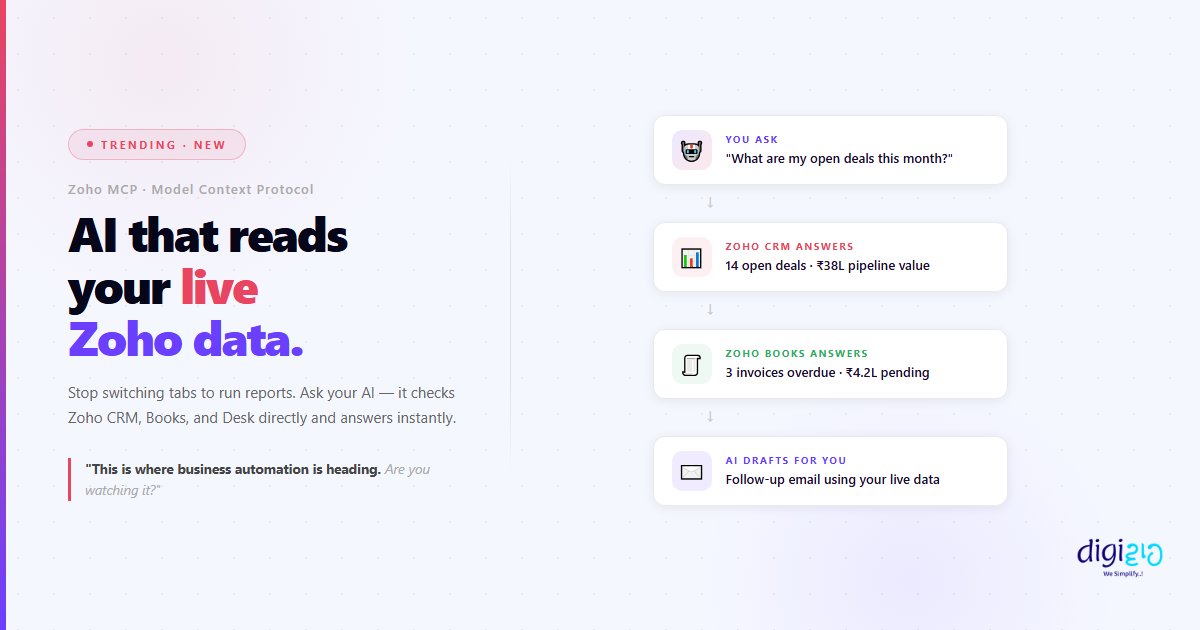
"What are my open deals this month and which ones haven't had activity in 7 days?" The AI reads your live CRM data and gives you the answer — with deal names, values, and last contact date — in seconds.
Invoice Status via Zoho Books
"Which invoices are overdue and by how much?" The AI checks Zoho Books directly and gives you a summary — total overdue amount, oldest outstanding invoice, clients to follow up with — without you opening Books at all.
Draft Follow-Up Emails
"Draft a follow-up email for the Sharma Technologies deal" — the AI pulls the deal details from Zoho CRM and writes a personalised, contextual email using your actual data. No copy-pasting from CRM into a doc.
Support Load via Zoho Desk
"How many open support tickets do we have and what are the top issues?" The AI reads Zoho Desk in real time and gives you a summary — ticket count, categories, oldest unresolved — so you can prioritise without logging into Desk.
The thread connecting all of these: no tab switching, no copy-pasting, no manual exports. You stay in one conversation with your AI, and the answers come from your live data automatically.
A chatbot replies with pre-written answers. Zoho MCP reads your live business data and responds to your specific situation.
Before vs After Zoho MCP
| Before Zoho MCP | After Zoho MCP |
|---|---|
| Open 3–4 Zoho apps to answer one question | Ask once — AI checks all apps simultaneously |
| Export reports, paste into AI, hope it understands | AI reads live data directly — no exports needed |
| 20 minutes for a weekly business review | 30-second summary on demand, any time |
| Draft emails manually using data from CRM | AI drafts emails using live CRM context |
| Data exists but takes effort to read | Data is instantly accessible through conversation |
| You run reports for the AI | AI runs reports for you |
Is Zoho MCP Right for Your Business?
Zoho MCP is particularly valuable if your business already uses multiple Zoho apps — CRM, Books, Desk, Projects — and you find yourself spending time each week stitching together information from different places.
It is most impactful for:
- Business owners who need a quick pulse on sales, revenue, and support without running reports
- Sales managers who review pipeline, deal activity, and follow-up status regularly
- Finance teams tracking invoice status, overdue payments, and cash flow across clients
- Operations teams monitoring support tickets, response times, and escalations
If you are currently using only one Zoho app, the benefit is smaller — but still real. The moment you start crossing apps (asking a question that spans CRM and Books, for example), Zoho MCP becomes significantly more valuable than any individual app dashboard.
This is also part of a larger shift in how Zoho CRM and the broader Zoho ecosystem are moving — towards AI-native workflows where your assistant understands your business context, not just your typed prompts. Paired with WhatsApp Business API automation, this creates a loop where AI reads your data, takes action, and communicates — all without manual steps. You can see how our clients are implementing this in our case studies.
Frequently Asked Questions
What is Zoho MCP?
Zoho MCP (Model Context Protocol) is a connection that allows AI assistants to read your live Zoho data directly. Instead of exporting reports and pasting them into AI tools, you ask a question and the AI retrieves the answer from your live Zoho CRM, Books, Desk, or other apps in real time.
Is Zoho MCP safe? Can the AI change my data?
Zoho MCP operates as a read-only connection by default — the AI can read your data to answer questions, but it cannot modify, delete, or write to your Zoho apps. Your data remains secure and unchanged.
Which Zoho apps does MCP work with?
Zoho MCP supports the core Zoho suite including Zoho CRM, Zoho Books, Zoho Desk, Zoho Projects, and Zoho Analytics. Zoho continues to expand MCP support across its product range. Check Zoho's official MCP documentation for the latest list of supported apps.
Which AI assistants support Zoho MCP?
Any AI assistant that supports the MCP standard can connect to Zoho MCP. This includes Claude (by Anthropic), and Zoho's own Zia AI. As MCP adoption grows, more AI tools are adding support for this protocol.
Do I need technical skills to set up Zoho MCP?
Basic setup requires configuring the MCP connection between your AI assistant and Zoho — which involves API credentials and a short configuration step. For non-technical business owners, having a Zoho implementation partner set this up is recommended. Once configured, using it requires no technical skills — you simply ask questions in plain English.
Conclusion
Your Zoho data has always been there. The pipeline numbers, the overdue invoices, the support ticket backlog — all of it sitting in different apps, requiring time and effort to bring together into one picture.
Zoho MCP removes that effort. You ask. Your AI reads your live data and answers. No tab switching. No copy-pasting. No exports. Just a conversation with an AI that actually knows your business — because it can see it in real time.
This is not a distant future. Zoho MCP is available now. Businesses that connect it early will run their weekly reviews faster, respond to clients with better context, and make decisions based on live information — not last week's export.
This is where business automation is heading. Are you watching it?
Want to connect Zoho MCP and start getting instant answers from your live business data?
📅 Schedule a Free Consultation 📥 Download Free eBook