

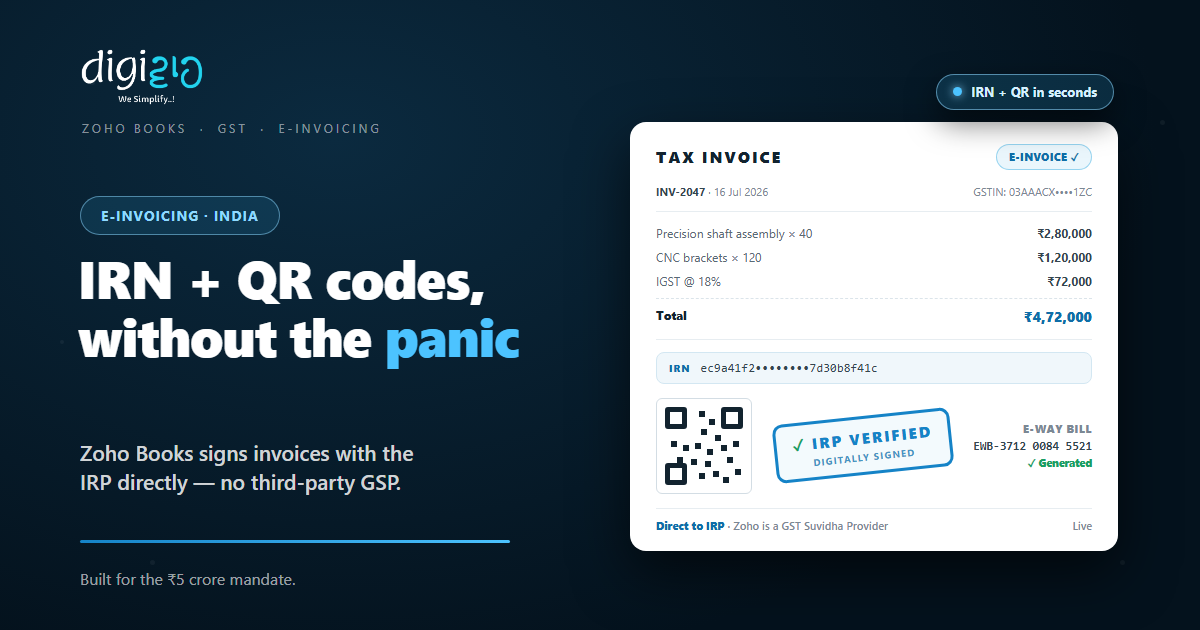
Zoho Books E-Invoicing: IRN and QR Codes Without the Panic
Crossed ₹5 crore? Every B2B invoice now needs an IRN. So here is how Zoho Books gets it for you, in seconds.
Last Updated: July 16, 2026
E-invoicing means reporting your B2B invoices to the government’s Invoice Registration Portal (IRP) before they count. The portal validates each invoice, signs it digitally, and returns an Invoice Reference Number (IRN) plus a QR code. Without that IRN, the invoice is not valid for GST.
That sounds like extra work, and done by hand, it is. But Zoho Books talks to the IRP directly. So the invoice you raise anyway comes back signed, stamped, and compliant — no separate portal visits, no third-party tools. This post covers who must e-invoice, how the flow works, and how Books removes the panic. (For GST filing basics, see our Zoho Books GST guide.)
Key Takeaways
- ₹5 crore is the line. Cross it in any year since FY 2017-18, and B2B e-invoicing applies to you.
- IRN + QR, automatically. The IRP validates, signs, and returns each invoice with its IRN and QR code.
- No middleman. Zoho is a recognized GST Suvidha Provider, so Books uploads to the IRP directly.
- E-Way bills too. Generate them from the same place, with details synced onward to the GST portal.
- Errors caught early. Books validates data before upload, so rejections happen on your screen, not the portal’s.
Table of Contents
- What Is E-Invoicing Under GST?
- Who Must E-Invoice (and Since When)
- How the IRP Flow Works
- Why Zoho Books Needs No Third Party
- Beyond the IRN: E-Way Bills, Returns, and Branches
- Manual E-Invoicing vs Zoho Books
- How to Start E-Invoicing in Zoho Books
- E-Invoicing in Action
- Frequently Asked Questions
- Conclusion
What Is E-Invoicing Under GST?
E-invoicing does not mean emailing a PDF. Instead, it means registering each B2B invoice with the government’s Invoice Registration Portal before it circulates. The IRP checks the invoice, signs it digitally, and returns two things: a unique Invoice Reference Number and a QR code. Those two marks make the invoice official.
The goal is one version of the truth. Because every invoice is registered centrally, the buyer’s records, the seller’s records, and the GST system all see the same document. So mismatches shrink, and input tax credit flows with fewer disputes.
Who Must E-Invoice (and Since When)
Zoho’s page states it plainly: “Starting 1 August 2023, e-invoicing is mandatory for businesses doing B2B and B2G transactions, whose turnovers are more than ₹5 crore.” As of 2026, that threshold still stands.
Two details trip people up. First, the rule has a memory. Cross ₹5 crore in any financial year since 2017-18, and e-invoicing applies — even if your turnover later dips below the line. Second, timing now matters for larger firms. Since 1 April 2025, businesses with ₹10 crore or more in turnover must report invoices to the IRP within 30 days. Miss that window, and the IRP rejects the invoice — no IRN, no valid invoice.
So the safe habit is simple. If you are anywhere near the threshold, treat e-invoicing as part of raising the invoice, not a month-end chore. Software makes that the default.
How the IRP Flow Works
The mechanics are a round trip. Your invoice goes up, and a signed version comes back. In Zoho’s words: “The IRP will be validating and digitally signing the e-invoice. It will then generate a unique Invoice Reference Number (IRN) and a QR code before returning the e-invoice to the creator.”
Step by step, that means: you raise the invoice, the invoice data uploads to the IRP, the portal validates and signs it, and the IRN plus QR code land back on your document. After that, the invoice can go to your customer — official, traceable, and GST-valid.
Done manually, this round trip means portal logins, JSON files, and copy-paste errors. Done from Zoho Books, it happens where the invoice already lives. The same record that tracks payment also carries its IRN and QR code.
Why Zoho Books Needs No Third Party
Here is the structural advantage. “Zoho is a recognized GST Suvidha Provider, which means your invoices can be directly uploaded to the IRP without relying on another GSP.” In short, the accounting software and the government gateway are the same pipeline.
Direct IRP Upload
No separate GSP subscription, no exporting files to a middleman tool. Books pushes invoices straight to the portal.
Errors Caught Before Upload
Books “preemptively validates your data” — violations, wrong entries, and missing mandatory fields get flagged on your screen first.
One Invoice, One Record
The IRN and QR code attach to the invoice you already raised. So there is no second system to reconcile later.
In Every Paid Plan
E-invoicing is available in all the paid plans of Zoho Books, starting from the Standard plan. No premium unlock needed.
Fewer hops also means fewer failure points. Because there is no third-party relay, there is one less place for an invoice to get stuck at month-end.
Beyond the IRN: E-Way Bills, Returns, and Branches
E-invoicing rarely travels alone. Goods above threshold values need e-Way bills, and every invoice eventually feeds your GST returns. So Books handles the neighbours too.
For transport, the setup is one step: “register Zoho Corporation as your GSP and start generating e-way bills.” No separate e-Way bill tool. For returns, the IRP does the carrying — invoice details sync to the GST portal and auto-populate in GST ANX-1 and ANX-2. So the numbers you file already match the invoices you registered.
And if you operate branches across states, multiple GSTIN support gives you “complete visibility on the transactions happening across all your branches” from one organization. The Ludhiana unit and the Pune unit stop living in separate spreadsheets. For the wider filing picture, our GST in Zoho Books post covers returns end to end.
Manual E-Invoicing vs Zoho Books
Both routes end with an IRN. But the working day looks very different along the way.
| Task | Manual / Portal Route | Zoho Books |
|---|---|---|
| Getting the IRN | Log in, upload JSON, download response | Returned to the invoice automatically |
| Error handling | Rejections discovered at the portal | Pre-validated before upload |
| QR code on invoice | Attach and re-share by hand | On the document, ready to send |
| E-Way bills | Separate portal, retyped details | Generated from the same records |
| GST returns | Reconcile invoices vs filings | IRP data auto-fills ANX-1 / ANX-2 |
| Multi-branch view | One login per GSTIN | Multiple GSTINs, one organization |
The pattern is the same in every row. Manual e-invoicing adds a parallel workflow. Books folds compliance into the workflow you already run.
How to Start E-Invoicing in Zoho Books
Getting live is mostly a one-time setup. Here is the path for a business crossing the threshold.
-
1Confirm you are covered by the mandate
Check turnover against ₹5 crore for every year since FY 2017-18 — the rule counts past years, not just this one. -
2Register on the e-invoice portal
Then enable API access there and register Zoho Corporation as your GST Suvidha Provider. -
3Connect Zoho Books to the IRP
Next, enable e-invoicing in Books settings with those portal credentials. This is one-time per GSTIN. -
4Fix data gaps before the first push
Books flags missing mandatory fields — GSTINs, HSN codes, addresses — so clean them up front. -
5Raise invoices as usual
Finally, push each B2B invoice to the IRP and watch the IRN and QR code come back onto the document.
Rule of thumb: if getting an IRN takes more effort than raising the invoice itself, your setup is wrong — the compliance step should be the easy one.
E-Invoicing in Action
Here is how the switch plays out for a business that just crossed the line.
Last year, turnover crossed ₹5 crore, and the mandate kicked in. For two months, the accountant generated IRNs by hand — portal logins, JSON uploads, and one rejected invoice that stalled a ₹4.7L OEM payment for a week. Then they enabled e-invoicing in Zoho Books and registered Zoho as their GSP. Now every B2B invoice goes to the IRP the moment it is raised. The IRN and QR code come back onto the document in seconds, and the e-Way bill is generated from the same screen. As a result, dispatches stopped waiting on compliance, and month-end lost its scariest job.
Notice what did not change: the invoices, the customers, the tax amounts. Only the round trip to the government became invisible. That is the whole point.
Frequently Asked Questions
What is e-invoicing under GST?
It is registering B2B invoices with the government’s Invoice Registration Portal (IRP). The IRP validates and digitally signs each invoice, then returns a unique Invoice Reference Number (IRN) and QR code that make it valid for GST.
Who must e-invoice in India?
Businesses with turnover above ₹5 crore doing B2B or B2G transactions, mandatory since 1 August 2023. The threshold counts any financial year from 2017-18 onward, so crossing it once brings you into the mandate permanently.
What is an IRN?
The Invoice Reference Number — a unique identifier the IRP generates after validating and digitally signing your invoice. It comes back with a QR code, and together they mark the invoice as registered and GST-valid.
Does Zoho Books need a third-party GSP?
No. Zoho is a recognized GST Suvidha Provider, so invoices upload directly from Books to the IRP. You register Zoho Corporation as your GSP on the portal once, and the pipeline is complete.
Can Zoho Books generate e-Way bills too?
Yes. With Zoho registered as your GSP, e-Way bills are generated directly from Books using the same invoice records. Invoice details also sync onward to the GST portal, auto-populating GST ANX-1 and ANX-2.
Which Zoho Books plans include e-invoicing?
Per Zoho, e-invoicing is available in all the paid plans of Zoho Books, starting from the Standard plan. So compliance does not require a top-tier subscription.
Conclusion
E-invoicing has real teeth: no IRN, no valid invoice — and for larger firms, a 30-day clock on top. But the burden is only heavy when it is manual. Registered once as a GSP pipeline, Zoho Books turns the whole mandate into a background step of raising an invoice.
So check your position first. Look at turnover for every year since 2017-18, not just the last one. If the mandate applies, get the portal registration and the Books connection done in one sitting. Then clean the master data — GSTINs, HSN codes, addresses — and let validation catch the rest.
One question to end on: if a big customer asked for a compliant e-invoice tomorrow morning, would it take you seconds or a scramble?
Crossing ₹5 crore and want e-invoicing set up cleanly — IRP, e-Way bills, and GST returns together? Talk to a Zoho Authorized Partner.
