

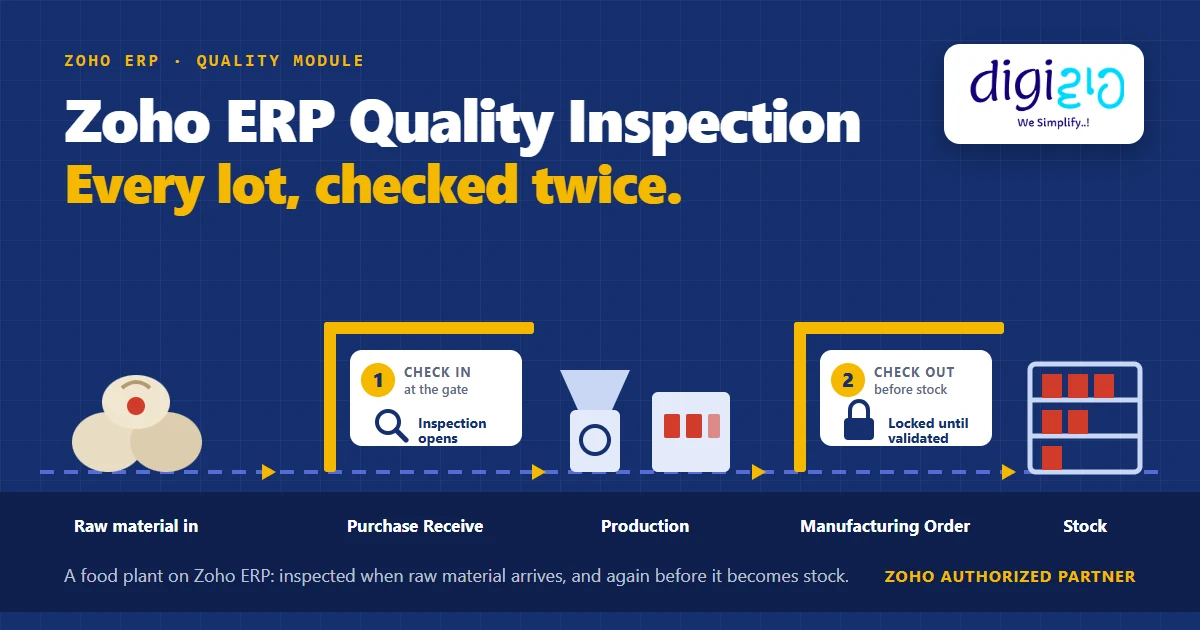
Short answer Zoho ERP quality inspection runs at two points. First, when your store saves a Purchase Receive as received, an active Quality Rule opens an inspection for the incoming lot. Second, when your team completes a Manufacturing Order’s job cards, another inspection opens, and you cannot mark that order completed until you validate the inspection. Templates set the sample count and the failures you allow.
A bag of wet chilli comes in at the gate. Nobody checks it. It goes into the grinder, then into pouches, then onto a truck, and you hear about it from a distributor three weeks later. Most food plants do check quality. The trouble is when: usually once, at the end, after the bad lot has already gone through the grinder.
Who this guide is for
This guide is for owners and plant heads of food processing units who are running, or considering, Zoho ERP. You will see how the Quality module checks material twice, what each setting means on the floor, where Zoho stops and your own setup begins, and how to set it up step by step.
- Two checkpoints, one module. Zoho ERP opens inspections after a Purchase Receive and after your team completes a Manufacturing Order’s job cards.
- The Manufacturing Order is a hard gate. If the item has a Quality Rule, you cannot complete the order until you validate its inspections.
- Sample Rate is a count, not a percentage. In other words, it is the number of samples that go to inspection.
- A blank Allowed Failures field means zero tolerance. Even a single failed unit fails the inspection.
- Where a failed lot goes is your decision. Zoho’s help pages do not describe a quarantine feature, so you set up a hold bin yourself.
- Available on both Standard and Premium plans, per Zoho’s India pricing page (checked October 2026).
- What is the Quality module in Zoho ERP?
- The four parts: templates, rules, inspections, worklists
- Checkpoint 1: Zoho ERP quality inspection at the Purchase Receive
- What happens to a failed lot?
- Checkpoint 2: Zoho ERP quality inspection on the Manufacturing Order
- How to set up quality inspection in Zoho ERP
- What Zoho ERP quality inspection does not do
- Frequently asked questions
What is the Quality module in Zoho ERP?
Zoho describes the Quality module as “a production control framework that ensures every item produced or purchased meets defined quality standards.” In plain terms, it lets you write down what a good lot looks like. Then, instead of relying on someone to remember, the system asks for a check at the right moment.
Zoho ERP’s Quality module covers two kinds of items: what you buy (raw material arriving through a Purchase Receive) and what you make (finished goods coming out of a Manufacturing Order). For a food processing unit, that maps exactly onto the two places a bad lot does damage: at intake, and at packing.
The four parts: templates, rules, inspections, worklists
Zoho ERP’s Quality module has four pieces. In addition, Zoho offers two working modes, set in the Quality Module Preferences: Simple View, which “supports inspections through Quality Rules and Quality Inspections”, and Advanced View, which “offers Quality Templates and Inspection Worklist in addition to Quality Rules and Quality Inspection modules.”
| Part | What it does | Masala-unit example |
|---|---|---|
| Quality Template | The checklist: type (Quantitative or Qualitative), parameters, Sample Rate, Allowed Failures, an inspection guide. | Whole Red Chilli: Moisture % Lesser Than 11, Foreign matter % Lesser Than 1. |
| Quality Rule | Links an item to a Transaction Type. Once active, it triggers the inspection automatically. | Whole Red Chilli + Purchase Receive. Red Chilli Powder 200 g + Manufacturing Order. |
| Quality Inspection | The record where the inspector enters Units Failed and validates. | Inspection on PR-2214: 3 of 10 samples failed. |
| Inspection Worklist | Advanced View only. Breaks an inspection “into executable tasks” and guides inspectors through each check. | QC executive’s list of today’s open checks. |
Points where inspections open: Purchase Receive and Manufacturing Order
Source: Zoho ERP help
Quality Rule per item under one Transaction Type
Source: Zoho ERP help
Failures tolerated when you leave Allowed Failures empty
Source: Zoho ERP help
Checkpoint 1: Zoho ERP quality inspection at the Purchase Receive
In most plants this is the GRN step. Zoho ERP calls it a Purchase Receive. Zoho’s help is direct: inspections are “automatically triggered … once items are received through Purchase Receives.” Your store team has to record the receive in received status, so the trigger is the moment they click Save as Received.
For example, here is how that plays out on a masala unit (sample data):
- Purchase Receive PR-2214: 40 bags of Whole Red Chilli, lot RM-0921.
- The item has an active Quality Rule for Purchase Receives, so an inspection opens on its own.
- The template says Sample Rate 10 and Allowed Failures 1.
- The inspector tests 10 samples. Three read 13.8% moisture against a limit of 11%. Units Failed: 3.
- Zoho auto-fills the Passed Quantity. Then, on Validate, the system generates the result: 3 failures against 1 allowed. The lot fails.
Two settings decide everything here, so it is worth being precise. Sample Rate is “the number of samples that will be sent for Quality Inspection”. In other words, it is a count of units, not a percentage of the lot. Allowed Failures, on the other hand, is how many of those samples may fail. Leave it empty and, in Zoho’s words, “even a single failed product will fail the Quality Inspection.”
What happens to a failed lot?
This is the question every plant owner asks, and the honest answer matters. Zoho’s Rules page says active Quality Rules “prevent completion of transactions until inspection requirements are met.” However, Zoho’s help pages do not describe a quarantine, hold or return-to-vendor feature for a failed Purchase Receive. They also do not say where the failed chilli physically goes.
So the routing of a failed lot is a setup decision, not a default. On our implementations we usually answer it with bins:
- A dedicated hold bin (for example QC-HOLD) in the raw-material store, where failed or doubtful lots sit.
- A release to the regular store bin through a Move Order, which Zoho uses “to transfer inventory within or between facilities”, once the QC head clears it. Note that you can use the Move Orders module only after you enable bins for at least one location.
- A named owner for every lot in that bin, so nothing waits there for a month.
From the implementation floor
The software part of quality setup is quick. The slow part is deciding, item by item, what a pass actually means: which parameters, how many samples, how many failures you will live with. Plants that write those numbers down before go-live get value from the module quickly. Plants that don’t end up validating everything.
Checkpoint 2: Zoho ERP quality inspection on the Manufacturing Order
The second checkpoint is on the production side, and here Zoho ERP is a hard gate. Inspections open “after job cards are completed for Manufacturing Orders”, and Zoho states plainly: “Only after all required inspections are successfully validated can the Manufacturing Order be marked as completed.”
That matters because completing the Manufacturing Order is what adds the finished goods to inventory. Until someone validates the inspection, the batch never reaches saleable stock.
On the masala unit (sample data), MO-0533 makes 2,000 pouches of Red Chilli Powder 200 g from a lot that passed at the gate. The template checks packet weight and seal integrity, with Sample Rate 20 and Allowed Failures left blank. As a result, a single bad pouch would fail it. Units Failed: 0. The inspector validates the inspection, and only then can you mark the order completed.
| Checkpoint 1: Purchase Receive | Checkpoint 2: Manufacturing Order | |
|---|---|---|
| Inspection opens when | Your store saves the receive as received | Your team completes the order’s job cards |
| What Zoho documents | Automatic trigger; rules “prevent completion of transactions until inspection requirements are met” | You cannot complete the order until you validate its inspections |
| What you decide | Where a failed lot goes (hold bin, release, return) | What a failed batch triggers (rework, scrap, re-pack) |
| Floor risk it removes | Wet or contaminated raw material reaching the grinder | Underweight or badly sealed packs reaching a distributor |
How to set up quality inspection in Zoho ERP
-
Enable the Quality module and pick a view
In Quality Module Preferences, choose Simple View for quantity-based checks. Alternatively, choose Advanced View if you want Quality Templates with measurable parameters and Inspection Worklists.
-
Create quality inspectors
An inspection needs an assigned inspector, and Zoho requires you to create one first. For that reason, map your QC executives before go-live.
-
Write a Quality Template for each critical item
Choose Quantitative (parameters such as Moisture % Lesser Than 11) or Qualitative (appearance and condition). Set Sample Rate as a count and decide Allowed Failures deliberately. Also note that you cannot edit a template once a rule uses it.
-
Create and activate Quality Rules
Pick the item and the Transaction Type. You get one rule per item per transaction type, so raw chilli gets a Purchase Receive rule and chilli powder gets a Manufacturing Order rule. Mark the rule active. Because you cannot edit a rule after inspections exist, test it first.
-
Decide where failed lots go
Enable bins, create a hold bin, and agree who releases stock from it through a Move Order. This is your process, so write it down.
-
Run one live lot end to end
Receive a lot, inspect it, release it, produce from it, inspect the batch and complete the Manufacturing Order. After that, fix the template before you roll it out to every item.
What Zoho ERP quality inspection does not do
Knowing the boundaries saves you a bad surprise after go-live. Based on Zoho’s help pages as of October 2026:
- No built-in food-safety compliance. The module is general-purpose. In fact, Zoho’s own examples are an electric-motor plant and a furniture factory. It does not claim FSSAI or HACCP features; instead, your parameters are what make it fit a food plant.
- No documented quarantine for failed receipts. The inspection opens automatically, but holding the stock is a bin-and-process setup.
- No edits after the fact. Templates lock once a rule uses them, and rules lock once inspections exist. Therefore, plan versions instead of editing live.
None of these are deal-breakers. Rather, they are setup work, and they are the part an implementation partner should design with you rather than leave to you.
Related reading: inventory management in ERP, purchase orders in ERP, and bills of materials in ERP. For a full rollout on a food plant, see our gate-to-dispatch Zoho ERP case study.
Frequently asked questions about Zoho ERP quality inspection
Does Zoho ERP have a quality control module?
Yes. Zoho ERP has a Quality module made of Quality Templates, Quality Rules, Quality Inspections and Inspection Worklists. It inspects both purchased items, at the Purchase Receive, and manufactured items, at the Manufacturing Order. In addition, Zoho’s India pricing page lists it on both the Standard and Premium plans.
When does Zoho ERP create a quality inspection automatically?
Zoho ERP creates an inspection automatically when an item has an active Quality Rule and either your store saves a Purchase Receive in received status, or your team completes the job cards of a Manufacturing Order. The rule’s Transaction Type decides which of the two applies.
What is Sample Rate in a Zoho ERP Quality Template?
Sample Rate is the number of samples that go to quality inspection on a Manufacturing Order or a Purchase Receive. In other words, it is a count of units, not a percentage of the lot. For example, a Sample Rate of 10 means the inspector checks ten units.
What happens if you leave Allowed Failures empty?
If you leave the Allowed Failures field empty in a Zoho ERP Quality Template, even a single failed product fails the quality inspection. So leave it blank only when you want zero tolerance, for example on packet seal checks.
Can you complete a Manufacturing Order before quality inspection in Zoho ERP?
No, not when the manufactured item has a Quality Rule. Zoho ERP requires you to validate the quality inspections before you can mark the Manufacturing Order as completed. As a result, the batch does not enter inventory until it passes.
Does a failed inspection stop the raw material from entering stock?
Zoho’s help pages do not describe an automatic quarantine for a failed Purchase Receive. The inspection opens and records the failure, but where the failed lot goes is a setup decision. A common approach is a dedicated hold bin, with Move Orders to release stock from it.
Does Zoho ERP’s Quality module cover FSSAI compliance?
No. Zoho ERP’s Quality module is a general-purpose inspection framework, and Zoho does not describe FSSAI or HACCP features for it. Instead, food plants make it fit by defining their own parameters, such as moisture, foreign matter, packet weight and seal checks.
Conclusion
In short, Zoho ERP quality inspection gives a food plant two checkpoints from one module: an automatic inspection when raw material arrives, and a hard gate that keeps an unvalidated batch out of stock. The templates and rules are quick to build once you know what a pass means. The part that needs thought is what happens to a lot that fails.
So, one question for your own floor: does your plant check at the gate, or only at dispatch?
Want quality checks built into your plant’s Zoho ERP, from intake to dispatch? Tell us how your floor runs today. Digiwah is a Zoho Authorized Partner.
