

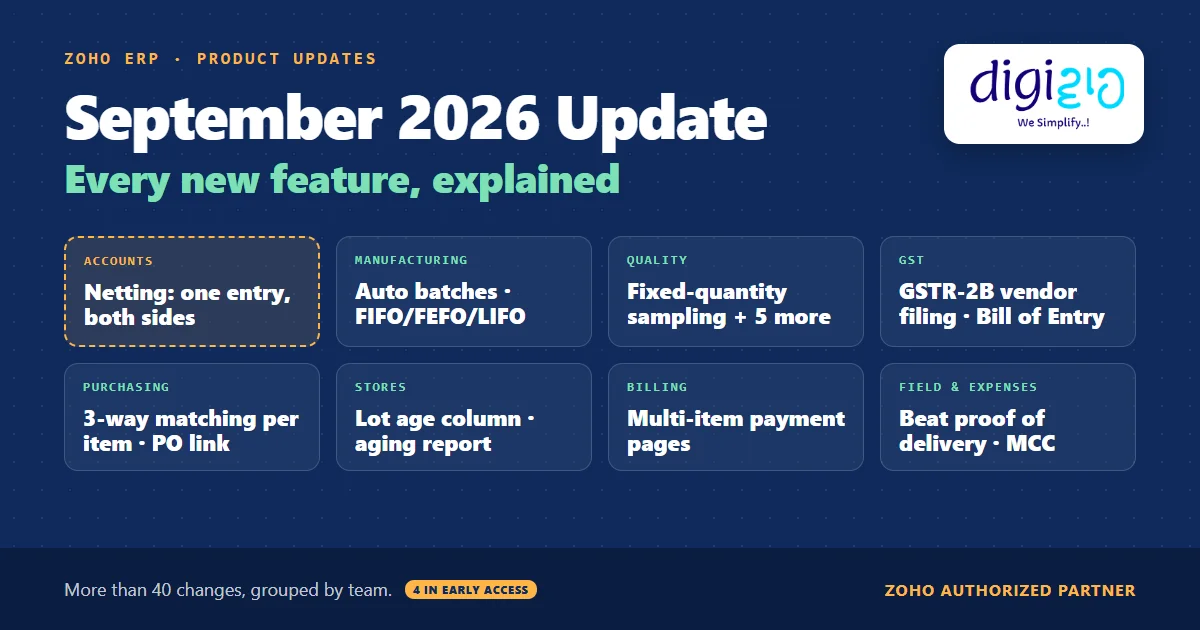
Short answer The Zoho ERP September 2026 update adds Netting for customers who are also vendors, plus more than 40 changes across manufacturing, quality, GST, purchasing, inventory, payments, subscriptions, expenses and the Beat app. The biggest ones are automatic batch numbers on manufacturing orders, GSTR-2B vendor filing insights, per-item three-way matching and Purchase Order links for vendors. Four features are in Early Access.
Zoho ships a new set of Zoho ERP changes every month. However, most teams only notice them when a screen suddenly looks different.
So this guide puts the whole September 2026 list in one place, grouped by the team that will use it, in plain English.
Who this guide is for
This guide is for owners, accounts heads, operations heads and store managers who run Zoho ERP, or are evaluating it. You will see every change in Zoho’s September 2026 product update, what each one does, which ones are in Early Access, a worked example, and a simple way to roll the changes out.
- Netting is the headline. If a customer and vendor are linked, you now offset their receivable and payable through one netting entry.
- Manufacturing orders get batch automation. Zoho ERP now generates batch numbers for finished goods and assigns component batches by FIFO, FEFO or LIFO, in the Premium and Custom plans.
- The Quality module gets six changes, including fixed-quantity sampling, re-evaluation, cancellation and inspections on transfer receives.
- GST work gets easier. You can see whether a supplier has filed an invoice in GSTR-1, reconcile Bill of Entry transactions, and validate HSN/SAC codes.
- Purchasing gets tighter. You can set two-way or three-way matching per item, share a Purchase Order through a public link, and lock Purchase Receives.
- Four features are in Early Access: expense restriction by merchant category code, usage limits on payment links, renewal pricing on advance invoices, and actual component consumption.
- What is in the Zoho ERP September 2026 update?
- Netting in the Zoho ERP September 2026 update
- Manufacturing order changes
- Quality changes, with a worked example
- GST and accounting changes
- Purchasing, inventory and warehouse changes
- Payments and subscriptions
- Travel, expenses and the Beat app
- Which features are in Early Access?
- How to roll out the update
- What the update does not tell you
- Frequently asked questions
What is in the Zoho ERP September 2026 update?
Zoho grouped the update into headline features, manufacturing, quality, distribution and a long list of other enhancements. For an easier read, however, the table below regroups it by team.
| Area | Main changes | Note |
|---|---|---|
| Accounts | Netting, vendor payment approval flow, Trial Balance and Balance Sheet filters, bank deposit fields | Netting needs linked contacts |
| GST | GSTR-2B vendor filing insights, Bill of Entry reconciliation, HSN/SAC validation and search | India-specific |
| Manufacturing | Auto batch numbers, FIFO/FEFO/LIFO batch assignment, actual consumption, record locking | Batches: Premium and Custom plans. Consumption: Early Access |
| Quality | Transfer receive inspections, fixed-quantity sampling, re-evaluate, cancel, CSV, PDF | Six changes |
| Purchasing and stores | Per-item three-way matching, PO public link, Purchase Receive locking, aging and lot reports | Longest list |
| Sales and billing | Multi-item payment pages, link usage limits, subscription transfer, renewal pricing | Two in Early Access |
| Expenses | Merchant category code restriction, change travel dates | MCC: Early Access, DFI card feeds only |
| Field teams | Beat app delivery runs, proof of delivery, quotes in sales beats | iOS and Android differ |
Netting in the Zoho ERP September 2026 update
Netting is the feature Zoho put first. In Zoho’s own words: “If a customer and vendor are linked, you can now offset their outstanding receivable and payable balances directly through a netting entry, instead of recording separate customer and vendor payments.”
So when a supplier also buys from you, you no longer record two full payments and match them in Banking. Instead, one entry offsets the two balances, and only the difference stays open. Before you start, link the customer and the vendor; Zoho ERP’s Customers and Vendors help asks that both records carry the same name. For the full walkthrough, read our guide to Zoho ERP netting.
Zoho ERP September 2026 update for manufacturing orders
Manufacturing Orders get four changes in this update:
- Automatic batch numbers and batch assignment. Zoho ERP now generates batch numbers for finished goods “based on the configured batch format”. In addition, it assigns batches to components automatically using “allocation strategies such as FIFO, FEFO, or LIFO”. Zoho says this “is available in the Premium and Custom plans of Zoho ERP.”
- Actual component consumption (Early Access). Next, you can now record the quantity you actually consumed when you complete a manufacturing order. However, you can update it “only when the order is In Progress and all related job cards are completed”, and not “after Quality Checks are initiated”. As a result, you can compare planned and actual material usage.
- Validation Rules, Record Locking and Related Lists. The Manufacturing Order module now supports all three. As a result, you can block bad data and stop edits on orders that should not change.
- In-transit quantity breakdown. The component table now shows the total in-transit quantity. When the Transfer Orders module is on, it counts both purchase orders and transfer orders; otherwise, it counts purchase orders only. Then hover over the figure to see the split.
For background on the structure behind a manufacturing order, see BOM in ERP.
Quality changes in the Zoho ERP September 2026 update
The Quality module gets six changes. Together, they fill gaps that teams usually hit in the first month of Zoho ERP quality inspection:
- Inspections on transfer receives. First, select Transfer Receive as the transaction type in a quality rule. Then Zoho ERP creates inspections “when the transfer receive is marked as received”.
- Fixed-quantity sampling. You can now set Sample Size and Allowable Failures as a Percentage or a Fixed Quantity. Simple mode sets them in the Quality Rule. In contrast, Advanced mode sets them in the Quality Template.
- Re-evaluate completed inspections. As a result, Passed or Failed records move back to In Progress, so you can edit and resubmit. However, only “Admins and Quality Managers can start a re-evaluation”, and “a reason is required”.
- Cancel inspections and worklists. First, you enter a reason to cancel. Also note that “a cancelled inspection cannot be retrieved”, and cancelling an inspection also cancels its worklists.
- Import and export rules and templates as CSV files. For example, you can back them up or reuse them across organisations.
- Download or print an inspection. Similarly, you can now save any inspection as a PDF from its details page.
Worked example: fixed-quantity sampling
Here is how fixed-quantity sampling works on a quality rule (sample data). First, you set Sample Size to a Fixed Quantity of 20 units and Allowable Failures to 2.
| Receipt | Quantity received | Units inspected | Why |
|---|---|---|---|
| Receipt A | 500 units | 20 | The quantity is at least the sample size, so Zoho ERP inspects the sample size |
| Receipt B | 12 units | 12 | The quantity is lower, so Zoho ERP inspects the entire quantity |
In other words, a percentage rule grows with every large receipt, while a fixed rule keeps your inspection load steady. Zoho also says the Allowable Failures “cannot exceed the Sample Size”. However, the update does not say how it scales Allowable Failures for a small receipt like Receipt B, so test that on your own rule.
Not sure which September changes your team should switch on? We will review the list against your processes and set up the ones that matter.
GST and accounting in the Zoho ERP September 2026 update
For Indian businesses, the GST items are the most practical part of this update:
- Vendor Filing Insights. You can now check “whether the supplier has filed the corresponding invoice in their GSTR-1 return, along with the related return period and vendor filing date”. Moreover, you see this on the Bill Details, Record Vendor Payment and Apply Vendor Credits pages, so you can check before you pay.
- Bill of Entry reconciliation. In addition, GSTR-2B Reconciliation now covers “Overseas and SEZ Bill of Entry transactions”, matched against the import details in your GSTR-2B data.
- HSN/SAC controls. You can make HSN/SAC mandatory for taxable items and validate the code against the goods or service type. In addition, a new search suggests matching codes, which helps you “avoid GST portal validation errors”.
Accounting also gets smaller but useful changes:
- First, Chart of Accounts custom fields can now appear as columns in the Trial Balance report.
- Also, location filters in the Trial Balance and Balance Sheet can now include child locations.
- Similarly, bank deposits now support custom fields and validation rules.
- With payment approval on, vendor payments follow one flow: you enter details first, an approver approves, and then “any user with an active bank integration can initiate the online payment”. Meanwhile, you record offline payments with Mark as Paid.
- Finally, Transaction Rules in Banking now have Advanced Search.
For how GST works in Zoho’s finance apps more broadly, see GST in Zoho Books.
Purchasing, inventory and warehouse changes
This is the longest list in the update, so we split it into three parts.
Purchasing
- Matching per item. For example, if bill reconciliation is on, you can now choose “no reconciliation, two-way matching, and three-way matching” for each item.
- Purchase Order public link. In addition, vendors can now “view, download, accept, or decline Purchase Orders” from a shareable link, “without requiring Vendor Portal access”.
- Purchase Receive locking at two levels. Also, you can restrict actions such as Edit, Delete, Mark as In Transit and Mark as Received, and also single fields such as Tracking Number and Quantity Received.
- Unit changes. Also, you can now change the unit of measurement in purchase requests and requests for quotes.
- A default Landed Cost Allocation Method. Similarly, you can now set one under Settings → General → Items → Preferences.
Stock reports
- First, the FIFO Cost Lot Tracking report gets an Age column that shows how long each lot has been held since it was received.
- Next, the Inventory Aging Summary gets a Do not include Transfer Order option. For example, stock received on 1 June and moved to another warehouse on 10 September keeps 1 June as its stock-in date.
- Also, the Order Fulfillment By Item report now filters by sales order number, customer name and Sales Order custom fields.
Warehouse and transaction controls
- First, Inventory Adjustments now support item-level custom fields, validation rules and record locking, and their export can include bin locations.
- Similarly, Transfer Orders now support validation rules and record locking.
- Also, you can import the Default Preferred Bin for items in bulk, and add custom fields to Move Orders, Bin Locations and Zones.
- In addition, Sales Returns now accept file attachments.
- Finally, CoCreate Agent, Zoho ERP’s “AI-assisted co-creation capability”, now works for Items, Transfer Orders and Inventory Adjustments.
Related reading: purchase orders in ERP and inventory management in ERP.
Payments and subscriptions
Zoho ERP’s billing side gets five changes:
- One payment page for many items. First, you select several items, mark each one mandatory or optional, and share a single Hosted Payment Page “using a URL or QR code”, or embed it on your website.
- Usage limits on payment links (Early Access). In addition, you can cap how many times a link completes a purchase, in total and per customer.
- Suggested donation amounts. Also, fund items on Hosted Payment Pages can now show suggested amounts.
- Renewal pricing on advance invoices (Early Access). Similarly, Zoho ERP now applies your configured renewal pricing automatically when it generates advance invoices.
- Subscription transfer. You can move an active subscription to another customer without cancelling it. However, “both customers must use the same currency”, and the history and schedules stay unchanged.
Travel, expenses and the Beat app
For travel and expenses, two changes arrive:
- Restrict expenses by merchant category code (Early Access). An expense from a restricted code “will automatically trigger an audit violation”. However, this works only for organisations that use DFI (Direct feed integration) card feeds.
- Change travel dates. Also, you can now change an itinerary’s dates without changing the destination, from Change Date in Trip Details.
Meanwhile, Beat, Zoho ERP’s app for field teams, gets different updates on each platform:
- iOS: a beats overview on the home page, delivery runs, proof of delivery for delivery beats, and restarting ended beats.
- Android: quotes in sales beats, and restarting ended beats.
Which Zoho ERP September 2026 update features are in Early Access?
Four features carry an Early Access note in Zoho’s September 2026 update post. For each one, Zoho asks you to “reach out to our support team” to switch it on:
| Feature | Area | Extra condition |
|---|---|---|
| Restrict expenses by merchant category code | Expenses | DFI card feeds only |
| Usage limits on Hosted Payment Page links | Payments | None stated |
| Renewal pricing on advance invoices | Subscriptions | None stated |
| Actual component consumption | Manufacturing | Order In Progress, job cards completed |
Separately, automatic batch numbers and batch assignment carry a plan note, not an Early Access note: Premium and Custom plans.
How to roll out the Zoho ERP September 2026 update
Many of these changes are settings that you choose to turn on. So a short, planned rollout works better than turning everything on at once:
-
Shortlist what touches your process
First, go through the table above with your accounts, stores and production heads. Mark the changes you will use, and skip the rest for now.
-
Check Early Access and plan notes
For the four Early Access features, raise a request with Zoho support. Then, for batch automation, confirm that your organisation is on the Premium or Custom plan.
-
Agree the GST and netting treatment with your CA
The update explains the screens, not the tax rules. Therefore, ask your CA how to treat netting entries and how to act on vendor filing insights.
-
Set up one area first
For example, move one quality rule to fixed-quantity sampling, or link one customer to its vendor record. After that, check the result on real transactions.
-
Lock what should not change
Next, use the new record locking on Manufacturing Orders, Purchase Receives, Transfer Orders and Inventory Adjustments to protect finished transactions.
-
Train the people it affects
For example, show delivery agents the Beat delivery runs, show approvers the new vendor payment flow, and tell quality staff that only Admins and Quality Managers can re-evaluate an inspection.
From the implementation floor
In practice, monthly updates reach your organisation whether you plan for them or not. For that reason, the teams that get value from them hold a short monthly review: the accounts head, the stores head and whoever owns Zoho ERP decide what to switch on, who tests it, and when. Without that owner, however, useful settings such as record locking or fixed-quantity sampling stay off for years.
What the Zoho ERP September 2026 update does not tell you
Knowing the gaps saves you a surprise later. Based on Zoho’s update post as of October 15, 2026:
- Short descriptions only. Most features get one or two paragraphs. As a result, menu paths, limits and edge cases are often missing, so check them in your own organisation.
- A confusing note on component consumption. Its Early Access note also says it is “only available for organizations using DFI (Direct feed integration) card feeds”. That line appears to be copied from the expense item. Therefore, confirm with Zoho support before you plan around it.
- Plan notes for one feature only. Only batch automation names plans. For the rest, however, the update states no plan restriction, so confirm availability in your organisation.
- No tax guidance. The GST items describe screens and statuses. However, they do not explain input tax credit rules or what to do when a supplier has not filed, so ask your CA.
- Different apps, different features. Finally, the Beat app updates differ between iOS and Android, and the update does not say when each platform will catch up.
None of these block a rollout. Rather, they are setup decisions, and they are the kind of work a Zoho ERP implementation partner should settle with your team.
Sources: Zoho ERP | Product updates | September 2026 (Zoho Community, What’s New), read on October 15, 2026 · Zoho ERP help: Customers and Vendors, Functions.
Frequently asked questions about the Zoho ERP September 2026 update
What is new in the Zoho ERP September 2026 update?
The Zoho ERP September 2026 update adds Netting for linked customers and vendors, automatic batch numbers and FIFO, FEFO or LIFO batch assignment on manufacturing orders, six Quality module changes, GSTR-2B vendor filing insights, Bill of Entry reconciliation, per-item three-way matching, Purchase Order public links, payment page and subscription changes, expense controls and Beat app updates.
Which features are in Early Access in the September 2026 update?
Four features carry an Early Access note: restricting expenses by merchant category code, usage limits on Hosted Payment Page links, renewal pricing on advance invoices, and recording actual component consumption on manufacturing orders. So to switch one on, Zoho asks you to contact its support team for your organisation.
Does Zoho ERP support FEFO for manufacturing batches?
Yes. Since the September 2026 update, Zoho ERP can assign batches to manufacturing order components automatically, using allocation strategies such as FIFO, FEFO or LIFO. In addition, it can generate batch numbers for finished goods from your batch format. Zoho says this is available in the Premium and Custom plans.
Can vendors see a Purchase Order without the Vendor Portal?
Yes. Zoho ERP now lets you share a Purchase Order through a public link, without Vendor Portal access. The vendor can view, download, accept or decline the Purchase Order from that link, including when you share the Purchase Order by email.
What changed in GSTR-2B reconciliation in Zoho ERP?
Two things changed. First, a bill now shows whether the supplier has filed the matching invoice in GSTR-1, with the return period and filing date. Second, GSTR-2B Reconciliation now covers Overseas and SEZ Bill of Entry transactions. Therefore, for the tax treatment of any mismatch, ask your CA.
Can I transfer a subscription to another customer in Zoho ERP?
Yes. You can now transfer an active subscription from one customer to another without cancelling it and creating a new one. However, both customers must use the same currency, and only active subscriptions qualify. The subscription’s history and schedules stay unchanged after the transfer.
Conclusion
In short, the September 2026 update is less about one big feature and more about control: netting for two-way parties, batch automation in manufacturing, tighter quality and purchasing rules, and better GST checks. Even so, each change needs a decision, not just a click.
So, one question for your team: which of these changes would you switch on first?
Put this month’s Zoho ERP changes to work
Digiwah, a Zoho Authorized Partner, reviews each monthly update against your processes, switches on what fits, and trains the people who use it.
Prefer to write? Tell us which updates you want to use.
