

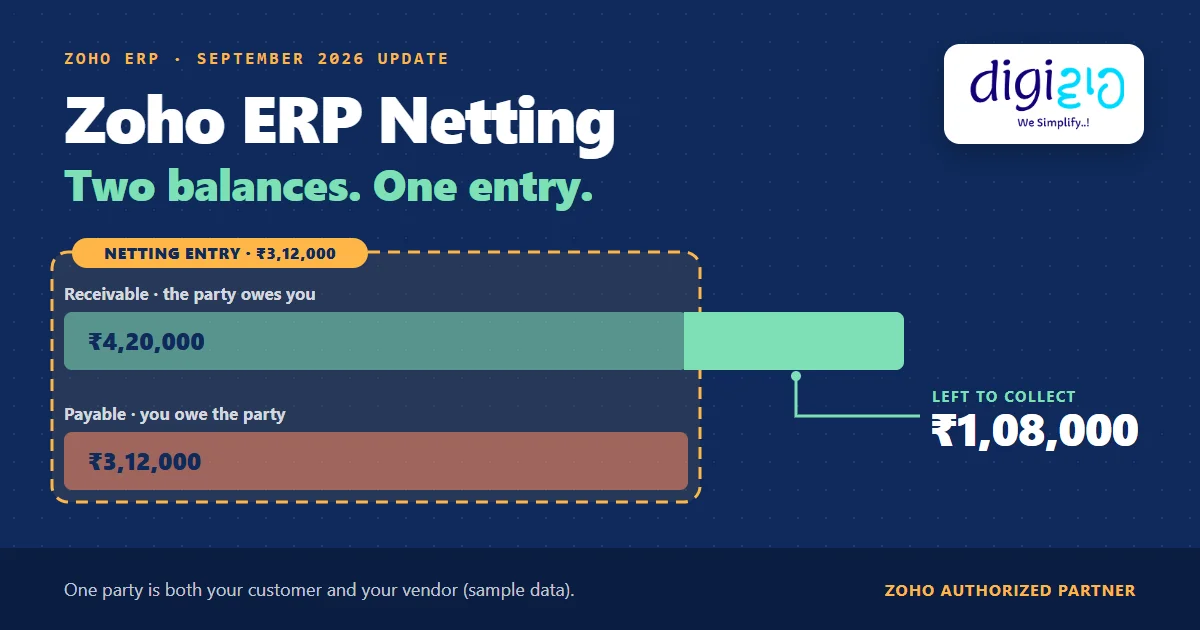
Short answer Zoho ERP netting settles a party that is both your customer and your vendor in one entry. It arrived in Zoho ERP’s September 2026 update. Once you link the customer and vendor records, you offset their outstanding receivable and payable balances through a netting entry, instead of recording separate customer and vendor payments. Only the difference stays open.
One of your suppliers also buys from you. They owe you ₹4,20,000. You owe them ₹3,12,000. Until now, your books recorded both full payments and then matched them in Banking, all to settle a ₹1,08,000 difference.
Zoho ERP’s September 2026 update changes that. It adds Netting, so one entry now does the job that two payments and a bank match used to do.
Who this guide is for
This guide is for owners, accounts heads and finance managers who run Zoho ERP, or plan to. In particular, it helps any business that buys from and sells to the same party: a manufacturer that sells scrap back to its raw material supplier, a distributor that trades stock with another distributor, or a sister concern that both bills you and buys from you. You will see what netting does, how it compares with the old method, a worked example, how to get your records ready, and what Zoho has not documented yet.
- Netting is new in Zoho ERP’s September 2026 update. It offsets the outstanding receivable and payable of a linked customer and vendor through one netting entry.
- Linking comes first. You link the customer to the vendor from the customer’s More menu, and both records must carry the same name.
- It replaces a longer workaround. Before, Zoho ERP’s help asked you to record two full payments and then match them against the bank line for the difference.
- Zoho has not published a Zoho ERP help page for netting yet. So the menu path and field rules are not documented for Zoho ERP as of October 15, 2026.
- Tax treatment is your CA’s call. Zoho’s update does not discuss GST or TDS on a set-off.
What is Zoho ERP netting?
Zoho announced the feature in its Zoho ERP product updates for September 2026 in one sentence: “If a customer and vendor are linked, you can now offset their outstanding receivable and payable balances directly through a netting entry, instead of recording separate customer and vendor payments.”
In plain terms, netting cancels what you owe a party against what that party owes you. As a result, only the difference stays open, and you collect or pay just that amount.
Most businesses meet this situation sooner or later. For example, a manufacturer buys raw material from a supplier and sells its scrap or by-products to the same supplier. Similarly, two distributors often buy stock from each other, and a service firm may rent equipment from a company it also does work for. Zoho ERP’s own help puts it simply: “Some businesses have customers, who are also their vendors.”
Netting entry instead of separate customer and vendor payments
Source: Zoho ERP update, Sept 2026
Records you link first: the customer and the vendor, with the same name
Source: Zoho ERP help
How did you settle a two-way party before netting?
Before netting, Zoho ERP’s help offered a workaround called Record Consolidated Amount. It is still on the Customers and Vendors help page, and it works like this:
- First, you “record full payment for both the invoice and the bill”, and you pick the same bank account in the Deposit To and Paid Through fields.
- Then, in Accounting → Banking, you open that bank account’s Uncategorized Transactions and find the statement line for the difference the party actually paid.
- Next, you tick “Include Withdrawals”, search, and match the customer payment and the vendor payment against that one line.
- Finally, you clear any leftover amount with an adjustment, because Zoho asks you to “ensure that the pending amount is ₹0” before you match.
The method works. However, your books show two full payments for money that never moved in full. In the example below, that means ₹7,32,000 of recorded payments to settle a ₹1,08,000 difference. Netting removes that detour.
| Before: Record Consolidated Amount | Now: netting entry | |
|---|---|---|
| Prerequisite | Customer and vendor linked | Customer and vendor linked |
| What you record | A full customer payment and a full vendor payment | One netting entry |
| Bank step | Match both payments to the bank line for the difference | Not part of Zoho’s description of netting |
| What stays open | Nothing, once the match clears ₹0 pending | The difference between the two balances |
Zoho ERP netting in practice: a worked example
Here is the arithmetic on one party that is both your customer and your vendor (sample data). You buy raw material from this party, and the same party buys finished goods from you.
| Document | What it is for | Who owes whom | Amount |
|---|---|---|---|
| Bill | Raw material you bought from the party | You owe the party | ₹3,12,000 |
| Invoice | Finished goods you sold to the party | The party owes you | ₹4,20,000 |
- The old way: you record a ₹4,20,000 customer payment and a ₹3,12,000 vendor payment, and then match both against the ₹1,08,000 that reaches your bank.
- With netting: one netting entry offsets ₹3,12,000 of the receivable against the ₹3,12,000 payable.
- The result: the bill is settled, and ₹1,08,000 of the invoice is still due. After that, the party pays you ₹1,08,000 and you record it as an ordinary customer payment.
In other words, your books now show what actually happened: a set-off of ₹3,12,000 and a payment of ₹1,08,000, rather than ₹7,32,000 of payments.
Do some of your suppliers also buy from you? We will link the contacts and set up netting with your accounts team.
How to get ready for Zoho ERP netting
Zoho ERP’s help documents the linking step today. The netting screen itself has no Zoho ERP help page yet, so the steps below get your records ready and leave the entry to the screen in your own Zoho ERP organisation.
-
List your two-way parties
Pull every party that appears in both your customer list and your vendor list. Start with the suppliers who also buy scrap, by-products or other goods from you.
-
Make the names match exactly
Zoho ERP’s help asks you to “ensure that both the customer and the vendor have the same name.” So fix spellings, suffixes such as “& Co.”, and duplicate records first.
-
Link the customer to the vendor in Zoho ERP
Go to Sales → Customers, open the customer, click More and select Link to Vendor. Then pick the vendor and click Link. Alternatively, start from the Vendors module and link the vendor to the customer.
-
Agree the rules with your CA
Zoho’s update does not discuss GST or TDS on a set-off. Therefore, ask your CA how your business should treat netting before your first entry.
-
Decide who owns Zoho ERP netting
Name the person who creates a netting entry and the person who checks it. Also fix how often you run it, for example at every month end.
-
Run one party end to end
Pick one party with a few open invoices and bills, create the netting entry in your Zoho ERP organisation, and confirm the open balance afterwards. After that, roll it out to the rest.
From the implementation floor
A two-way party is rarely a software problem. Usually, sales owns the invoice and purchase owns the bill, so nobody owns the net figure. Before you switch netting on, therefore, decide who creates a netting entry, who checks it, and how often you run it. That one decision keeps both ledgers honest.
What Zoho has not documented about Zoho ERP netting (yet)
Knowing the gaps saves you a surprise later. Based on Zoho ERP’s pages as of October 15, 2026:
- No Zoho ERP help page for netting. The September update announces the feature, but Zoho ERP’s help still documents only the older Record Consolidated Amount method.
- No documented menu path or field rules. The update does not say where netting sits in the menu, how many documents one entry can hold, or how you undo an entry. Check these on your own screen.
- Linked contacts only. Netting applies when “a customer and vendor are linked”, and linking needs the same name on both records.
- No accounting or tax guidance. The update does not list the accounts a netting entry posts to, and it does not discuss GST or TDS. Ask your CA before you start.
- No plan or Early Access note. Other items in the same update carry Early Access notes; netting does not. Still, confirm that the module appears in your organisation.
None of these block a rollout. Rather, they are setup decisions, and they are the kind of work a Zoho ERP implementation partner should settle with your accounts team.
Related reading: bank reconciliation in Zoho Books, purchase orders in ERP, and Zoho ERP quality inspection.
Frequently asked questions about Zoho ERP netting
What is netting in Zoho ERP?
Netting in Zoho ERP offsets the outstanding receivable and payable balances of a customer and vendor that you have linked. Instead of recording a separate customer payment and vendor payment, you create one netting entry. Zoho added it in the September 2026 Zoho ERP product update.
Do I need to link the customer and vendor before Zoho ERP netting?
Yes. Zoho’s update says netting works “if a customer and vendor are linked.” In Zoho ERP, open the customer, click More and choose Link to Vendor. Also, Zoho ERP’s help asks that the customer and the vendor have the same name.
Where do I find netting in Zoho ERP?
Zoho has not yet published a Zoho ERP help page that gives the menu path for netting. The September 2026 update confirms the feature, so check your own Zoho ERP organisation, or ask your implementation partner to walk you through it.
Is Zoho ERP netting an Early Access feature?
Zoho’s September 2026 update gives netting no Early Access note and no plan restriction, although other items in the same update carry Early Access notes. Even so, confirm that the module appears in your own Zoho ERP organisation before you plan around it.
Is netting the same as recording a consolidated payment?
No. With Record Consolidated Amount, you record full payments on both the invoice and the bill and then match them to a bank line for the difference. In contrast, a netting entry offsets the two balances directly, instead of separate customer and vendor payments.
Does Zoho ERP netting handle GST or TDS?
Zoho’s update does not discuss GST or TDS, and it does not list the accounts a netting entry posts to. Therefore, check with your CA how your business should treat a set-off between a customer and a vendor before you rely on netting.
Conclusion
In short, Zoho ERP netting turns a two-way party from a monthly puzzle into one entry. You link the contacts, offset the two balances, and only the true difference stays open. The linking is quick. The part that needs thought is who owns the net figure, and how your CA wants the set-off treated.
So, one question for your own books: how many of your suppliers also buy from you?
Settle every two-way party in one entry
Digiwah, a Zoho Authorized Partner, links your customer and vendor records, sets up netting, and walks your accounts team through the first netting entry.
Prefer to write? Send us how your books run today.
