

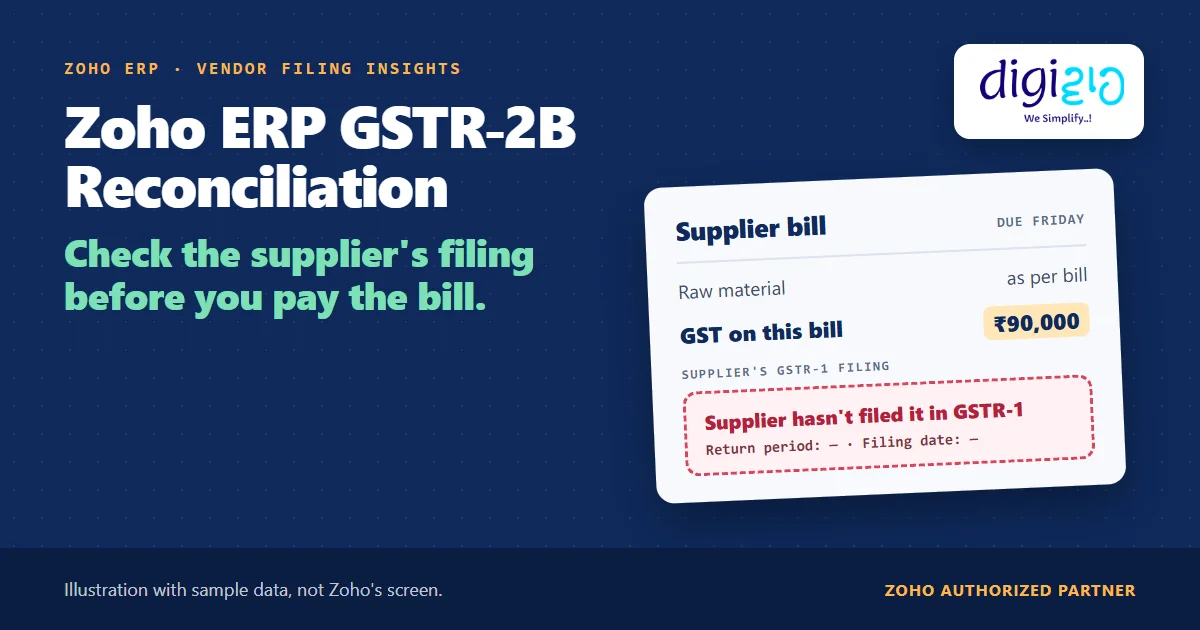
Short answer Zoho ERP GSTR-2B reconciliation fetches your GSTR-2B from the GST portal and sorts each supplier invoice into Matched, Partially Matched, Missing in GSTN or Missing in Zoho ERP. Since the September 2026 update, a bill also shows whether the supplier filed it in GSTR-1, with the return period and filing date, before you pay.
It’s Friday. A supplier’s bill is due, with ₹90,000 of GST on it. Paying the supplier, however, does not make that GST your credit. Under the GST law, your input tax credit depends on the supplier reporting the invoice first.
Until now, you found that out at month end, inside the GSTR-2B reconciliation. Zoho ERP’s September 2026 update moves the answer onto the bill itself, so you can check it before the money leaves.
Who this guide is for
This guide is for owners, accounts heads and GST executives who run Zoho ERP, or plan to. It suits any GST-registered business that buys from many suppliers and claims input tax credit every month. You will learn why GSTR-2B decides your credit, how to set up and fetch it in Zoho ERP, what each reconciliation tab means, what Vendor Filing Insights adds, and what Zoho does not do for you.
- Your credit waits on your supplier. Section 16(2)(aa) of the CGST Act ties input tax credit to the supplier furnishing the invoice in their outward supply statement.
- Zoho ERP fetches GSTR-2B for you. First, you enable API access for Zoho ERP on the GST portal; then you click Fetch Summary next to GSTR 2B.
- Five tabs tell you where each invoice stands: Missing in GSTN, Missing in Zoho ERP, Partially Matched, Matched and Reconciled.
- Vendor Filing Insights is new in September 2026. Bill Details, Record Vendor Payment and Apply Vendor Credits now show whether the supplier filed the invoice in GSTR-1.
- It informs; it does not block. Zoho shows the status. You decide whether to pay, hold or follow up.
- Imports are covered too. Overseas and SEZ Bill of Entry transactions now reconcile against GSTR-2B.
- What is Zoho ERP GSTR-2B reconciliation?
- Why does the supplier’s GSTR-1 decide your credit?
- How to set up Zoho ERP GSTR-2B reconciliation
- What do the reconciliation tabs mean?
- Vendor Filing Insights: the September 2026 change
- A worked example: the ₹90,000 bill
- Bill of Entry, IMS and regenerating GSTR-2B
- What Zoho ERP does not do for you
- Frequently asked questions
What is Zoho ERP GSTR-2B reconciliation?
GSTR-2B is the monthly statement of input tax credit that the GST system prepares for you from your suppliers’ filings. Zoho ERP’s GSTR-2B Reconciliation help describes it this way: “It is prepared based on details furnished by suppliers in GSTR-1, GSTR-5, and GSTR-6, as well as data received from the ICEGATE system (Indian Customs Electronic Gateway).” It adds that, for the same reason, GSTR-2B “does not include TDS and TCS details.”
Reconciliation, then, means comparing two lists. One list holds the purchase bills you recorded in Zoho ERP. The other holds the invoices your suppliers reported. Zoho ERP pulls the second list from the GST portal, lines it up against the first, and shows you every gap.
Reconciliation tabs: Missing in GSTN, Missing in Zoho ERP, Partially Matched, Matched, Reconciled
Source: Zoho ERP help
Pages that now show the supplier’s GSTR-1 filing: Bill Details, Record Vendor Payment, Apply Vendor Credits
Source: Zoho ERP update, Sept 2026
Why does the supplier’s GSTR-1 decide your credit?
Because the law says so, not Zoho. Section 16(2) of the CGST Act says no registered person is entitled to input tax credit unless, among other conditions, “the details of the invoice or debit note referred to in clause (a) has been furnished by the supplier in the statement of outward supplies and such details have been communicated to the recipient”.
Similarly, Rule 36(4) of the CGST Rules names the forms. The supplier must furnish the invoice “in FORM GSTR-1” (or the invoice furnishing facility), and the details must reach you “in FORM GSTR-2B”.
So a bill can be correct, the goods can be in your store, and the payment can be on time, and still the credit waits. It waits until the supplier reports the invoice. In other words, the supplier’s filing is part of your credit, and you need to watch it.
How to set up Zoho ERP GSTR-2B reconciliation
Zoho ERP’s GST Filing help and its GSTR-2B page give the setup in this order. You do the first three steps once, and the last two every month.
-
Configure GST in Zoho ERP
Go to Settings, select Taxes under Taxes & Compliance, and pick your GSTIN under GST Settings. Then open General, enter the details and click Save.
-
Set up online filing
On the same GST Settings page, open Online Filing Settings. Next, enter your GSTN Username and Reporting Period, and click Save.
-
Enable API access on the GST portal
Log in to the GST portal, click My Profile, and choose Manage API Access from Quick Links. Then select Yes under Enable API Request, pick a Duration and click Confirm. Zoho calls this a prerequisite: “To fetch and reconcile GSTR-2B, you must enable API access for Zoho ERP in the GST portal.”
-
Fetch GSTR-2B every month
Go to Accounting, open the Taxes & Filing dropdown and select GST Filing. Pick the return period under GST Summary for, and click Fetch Summary next to the GSTR 2B return. If your GST session has expired, click Generate OTP and enter the OTP sent to your registered mobile number or email.
-
Work through the Reconciliations tab
First, check totals in the Overall Summary tab. Then open the Reconciliations tab, where Zoho ERP “automatically categorises the transactions”, and act on each one from the Action dropdown.
What do the Zoho ERP GSTR-2B reconciliation tabs mean?
Each tab answers one question about an invoice: does it exist on both sides, and do the details agree? Here is what Zoho ERP’s help says about each tab, and what you can do there.
| Tab | What it holds | Your action in Zoho ERP |
|---|---|---|
| Missing in GSTN | Bills you recorded in Zoho ERP that are not on the GST portal | Add to GSTN |
| Missing in Zoho ERP | Invoices on the portal with no matching record in Zoho ERP | Create and Match |
| Partially Matched | Records that match the portal only in part | Accept, or Modify and Match |
| Matched | Records that match, including ones you matched by hand | No action needed |
| Reconciled | Portal records that match your Zoho ERP records | No action needed |
One rule trips people up. Zoho ERP’s help notes that “the Accept option appears only for transactions under Matched and Partially Matched.” Therefore, a portal invoice under Missing in Zoho ERP needs a record first, through Create and Match.
In practice, Missing in GSTN is the tab to watch. It lists bills you have booked, and perhaps already paid, that your supplier has not yet reported. Each line there is credit that waits on someone else.
Vendor Filing Insights: the September 2026 change to Zoho ERP GSTR-2B reconciliation
The Zoho ERP product updates for September 2026 list it under GSTR-2B Reconciliation Enhancements: “You can now check the GSTR-2B reconciliation status of a bill by checking whether the supplier has filed the corresponding invoice in their GSTR-1 return, along with the related return period and vendor filing date.”
The bigger change is where it shows. Zoho says you can see these details “without leaving the Bill Details, Record Vendor Payment, or Apply Vendor Credits pages.” Those are the screens your accounts team already opens, and two of them sit right at the moment of payment.
| Before September 2026 | With Vendor Filing Insights | |
|---|---|---|
| Where you see the supplier’s filing | In the GSTR-2B reconciliation under GST Filing | Also on Bill Details, Record Vendor Payment and Apply Vendor Credits |
| What you see | The tab the invoice falls under | Whether the supplier filed it in GSTR-1, the return period and the vendor filing date |
| When you usually find out | During the monthly reconciliation, often after payment | On the bill, before you record the payment |
A worked example: the ₹90,000 bill
Here is how it plays out for one supplier bill (sample data). You buy raw material from a regular supplier. The bill carries ₹90,000 of GST, and the payment is due on Friday.
- On Thursday: your accounts executive opens Record Vendor Payment. Vendor Filing Insights shows that the supplier has not filed this invoice in GSTR-1 yet, so the return period and the filing date are blank.
- The decision: Zoho does not stop the payment. Instead, your team calls the supplier, asks when they will report the invoice, and follows your own rule: pay on time, hold part of it, or pay and track.
- The following week: the same bill now shows the invoice as filed, with return period September 2026 and a vendor filing date of 11 Oct 2026. As a result, the ₹90,000 stops being a question mark at month end.
Before the update, the same team would have found the gap weeks later, in the Missing in GSTN tab, after the money had gone out.
Do you check a supplier’s GSTR-1 filing before you pay them? We will set up GSTR-2B reconciliation in Zoho ERP and build the check into your payment routine.
Bill of Entry, IMS and regenerating GSTR-2B in Zoho ERP
Bill of Entry in Zoho ERP GSTR-2B reconciliation
The September 2026 update also adds imports. In Zoho’s words, “GSTR-2B Reconciliation in Zoho ERP now supports Bill of Entry transactions. You can reconcile Overseas and SEZ Bill of Entry transactions recorded in Zoho ERP with the corresponding import transaction details available in your GSTR-2B data from the GST Portal.” So if you import raw material or buy from an SEZ unit, those entries now sit in the same reconciliation as your domestic bills.
Where the Invoice Management System fits
Zoho ERP also has an Invoice Management System (IMS) screen under GST Filing. There, you click Pull From GSTN, review your suppliers’ invoices under Matched, Partially Matched and Missing in Zoho ERP, and mark each one Accepted, Rejected or Pending. Then you click Push to GSTN to send those actions to the portal. Your IMS actions shape what reaches GSTR-2B, so finish them before you fetch.
Regenerating GSTR-2B
After IMS changes, you can regenerate GSTR-2B from View Summary, then Regenerate in the top right. Zoho ERP’s help sets two conditions. First, “If GSTR-3B for the previous return period is not filed, you must file it before regenerating GSTR-2B for the current period.” Second, “If you are a QRMP taxpayer, you can generate GSTR-2B only in the last month of the quarter.” Before you file GSTR-3B, there is no limit on how often you regenerate.
From the implementation floor
Most credit leaks we see are not reconciliation errors. They are timing errors: the bill gets paid in full on Friday, and the gap shows up three weeks later in Missing in GSTN. So the useful setup is a payment rule your team can follow, for example “check the supplier’s filing on Record Vendor Payment before releasing large bills”, and one named person who follows up with suppliers every week.
What Zoho ERP GSTR-2B reconciliation does not do for you
Knowing the limits keeps the feature honest. Based on Zoho ERP’s pages as of October 16, 2026:
- It does not block a payment. Vendor Filing Insights shows a status. Whether you pay, hold or deduct is your rule, and Zoho does not enforce one.
- The screen wording is not documented. Zoho describes what you see (filed or not, return period, filing date) but has not published how the status looks. The figure above is our illustration.
- The refresh timing is not documented. The update does not say whether you need to fetch GSTR-2B first, or how often the status refreshes. Check on your own screen.
- No TDS or TCS. Zoho ERP’s help states that GSTR-2B “does not include TDS and TCS details.”
- It needs the portal link. Without API access enabled on the GST portal, Zoho ERP cannot fetch GSTR-2B.
- It is not tax advice. Whether to hold a payment, and how to treat credit that arrives late, is a question for your CA.
None of these stop a rollout. Rather, they are setup decisions, and they are the kind of work a Zoho ERP implementation partner should settle with your accounts team.
Related reading: every change in the Zoho ERP September 2026 update, Zoho ERP netting, and purchase orders in ERP.
Frequently asked questions about Zoho ERP GSTR-2B reconciliation
How do I do GSTR-2B reconciliation in Zoho ERP?
First, enable API access for Zoho ERP on the GST portal. Then go to Accounting, Taxes & Filing, GST Filing, pick the return period and click Fetch Summary next to GSTR 2B. Finally, work through the Reconciliations tab, where Zoho ERP sorts each transaction and you act on it from the Action dropdown.
What is Vendor Filing Insights in Zoho ERP?
Vendor Filing Insights arrived in Zoho ERP’s September 2026 update. It shows whether a supplier has filed the invoice behind your bill in their GSTR-1 return, along with the return period and the vendor filing date. You see it on the Bill Details, Record Vendor Payment and Apply Vendor Credits pages.
Does Zoho ERP stop a payment if the supplier has not filed GSTR-1?
No. Zoho’s update describes Vendor Filing Insights as a status you can check, not a block. Your team decides whether to pay, hold or follow up. Therefore, write a simple payment rule, and ask your CA how to treat bills whose invoices the supplier has not reported yet.
What does Missing in GSTN mean in Zoho ERP?
Missing in GSTN lists transactions you recorded in Zoho ERP that are not available on the GST portal. Often, it means the supplier has not reported the invoice yet. Zoho ERP gives an Add to GSTN action on this tab, which moves the transaction to the Matched section.
Why can’t I accept an invoice under Missing in Zoho ERP?
Zoho ERP’s help says the Accept option appears only for transactions under Matched and Partially Matched. An invoice under Missing in Zoho ERP has no matching record yet. So use Create and Match to create the transaction in Zoho ERP, which moves it to Matched.
Can Zoho ERP reconcile import Bills of Entry with GSTR-2B?
Yes, since the September 2026 update. Zoho says GSTR-2B reconciliation in Zoho ERP now supports Bill of Entry transactions, so you can reconcile Overseas and SEZ Bills of Entry recorded in Zoho ERP against the import details in your GSTR-2B data from the GST portal.
Conclusion
In short, Zoho ERP GSTR-2B reconciliation already showed you where every supplier invoice stood at month end. The September 2026 update moves that answer to the bill and the payment screen, where it can still change a decision. The setup is quick. The part that needs thought is your payment rule, and who follows up with suppliers.
So, one question for your accounts team: do you check a supplier’s filing before you pay them?
Check every supplier before you pay
Digiwah, a Zoho Authorized Partner, sets up GST filing and GSTR-2B reconciliation in Zoho ERP and builds the supplier check into your payment routine.
Prefer to write? Send us how your GST work runs today.
