

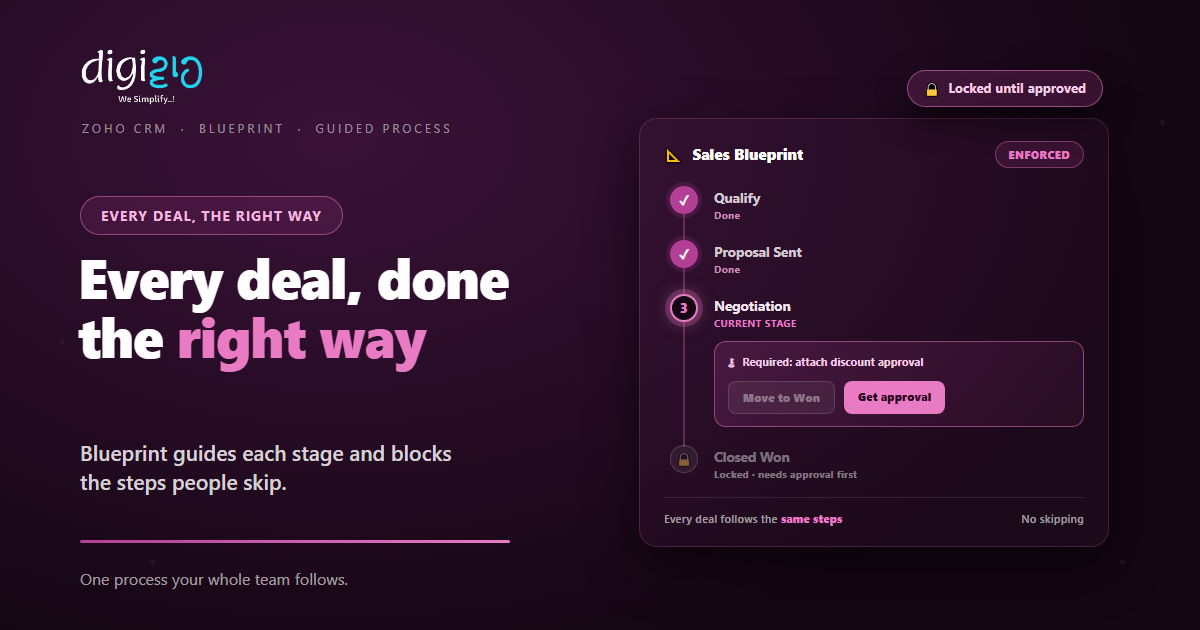
Zoho CRM Blueprint: Stop Skipped Steps and Guide Every Deal
Blueprint turns your sales process into guided stages with rules built in. So every deal follows the same path, and no one skips a step.
Last Updated: July 2, 2026
Zoho CRM Blueprint takes the sales process in your head and builds it into the CRM. So instead of hoping reps follow the steps, the system guides them. In Zoho’s words, Blueprint “helps you enforce standard processes at scale.” As a result, every deal moves the same way, every time.
This matters because a process only works if people follow it. After all, one rep skips the demo, another forgets the approval, and deals start to leak. But Blueprint blocks the shortcuts. In this guide, you will see how it works and how to set one up.
Key Takeaways
- One process for all. Blueprint builds your sales steps into the CRM.
- States and transitions. Stages, plus the only moves a rep can make.
- Rules at each step. Mandatory fields, checklists, and approvals before moving on.
- Guided, not guessed. Reps always see the next valid action.
- Nothing sits too long. Alerts and escalations keep deals moving.
Table of Contents
- What Is Zoho CRM Blueprint?
- Why Sales Processes Break Down
- States and Transitions: The Building Blocks
- What a Transition Can Enforce
- Guided Selling and Automation
- SLAs, Alerts, and Reports
- Without Blueprint vs With Blueprint
- How to Build a Blueprint in Zoho CRM
- Blueprint in Action
- Frequently Asked Questions
- Conclusion
What Is Zoho CRM Blueprint?
Blueprint is the tool in Zoho CRM that lets you design and enforce a process. So you map your real sales stages, then build them into the system. After that, the CRM guides each deal through those stages in order.
In plain terms, it is an online version of your offline process. As Zoho explains, Blueprint lets you “capture every stage of these offline sales processes inside your CRM and execute them systematically.” So your team always knows what to do next.
Why Sales Processes Break Down
Most teams do have a process. But it lives in a slide deck or a manager’s head. So under pressure, people cut corners. One rep sends a quote before qualifying. Another marks a deal won with no approval.
The result is messy and hard to trust. After all, if every rep works differently, your pipeline data means little. Meanwhile, new hires take months to learn the “right” way. But Blueprint puts that process where the work happens, so the right way is the only way.
States and Transitions: The Building Blocks
Blueprint runs on two simple ideas. So once you grasp these, the rest clicks into place.
- States. These are the stages of your process, like Qualify, Proposal, or Won. In short, a state is where a deal sits right now.
- Transitions. These are the moves between states. So a transition is the button a rep clicks to push a deal forward.
Here is the clever part. A rep only sees the transitions that are valid right now. So they cannot jump from Qualify straight to Won. Instead, they follow the path you drew, one step at a time.
What a Transition Can Enforce
A transition is more than a button. In fact, it can demand things before a deal moves on. So this is where the “enforce” in Blueprint really lives.
Mandatory Fields
Make key fields required during the move. So no deal advances with blank details.
Checklists & Conditions
Check that certain criteria or tasks are met first. So each stage finishes properly.
Who Can Move It
Limit a transition to the right person. So only a manager can approve a discount.
Automated Actions
Fire tasks, emails, or field updates on the move. So routine steps just happen.
Because of these rules, the process polices itself. So a deal simply will not move to the next state until the right things are done. As a result, your pipeline reflects reality, not wishful thinking.
Guided Selling and Automation
Blueprint does not just block; it also guides. So at each state, you can show clear instructions on what to do next. In Zoho’s words, you “guide sales reps on what they need to do at each stage while also automating any standard actions.”
That mix is the point. First, the rep gets a nudge toward the next step. Then the system handles the busywork around it. For deeper automation, Blueprint pairs well with workflow rules, which run in the background across your CRM.
So new reps ramp up faster, too. After all, the process is on screen, not in a manual. As a result, they sell the right way from day one.
SLAs, Alerts, and Reports
A stuck deal is a silent problem. So Blueprint adds time limits to keep things moving. In effect, you can “ensure no lead or deal sits unattended for too long at any stage,” with alerts and escalations when one does.
Then comes the learning loop. Because every deal follows the same states, you can measure each one. So built-in reports show where deals slow down or drop off. Plus, you can dig deeper with Zoho Analytics to refine the process over time.
Without Blueprint vs With Blueprint
The gap shows up fastest when a team grows. But even a small team feels it. So the table below sums up the difference.
| Area | Without Blueprint | With Blueprint |
|---|---|---|
| Consistency | Every rep does it differently | One process for all |
| Skipped steps | Easy to jump a stage | Blocked until done |
| Required info | Fields left blank | Mandatory before moving on |
| Approvals | Forgotten or bypassed | Built into the transition |
| Where a deal is | Anyone’s guess | Clear state and next action |
So Blueprint trades chaos for a clear path. After all, a known process is one you can improve. But a hidden one just hides the leaks.
How to Build a Blueprint in Zoho CRM
You do not need to map everything at once. Instead, start with one process and grow from there. So here is a simple path to follow.
-
1Map your real process
First, list the stages a deal actually goes through. So you know which states to create. -
2Add your states
Next, create each stage in the Blueprint editor. So your pipeline gains a clear backbone. -
3Draw the transitions
Then link the states with the moves a rep can make. So the valid path is the only path. -
4Set the rules for each move
Now add mandatory fields, checklists, and who can act. So each step finishes properly. -
5Automate, publish, and refine
Finally, attach actions and go live. A Zoho partner can tune it as your process matures.
Pick the one step your team skips most. Then make it a required transition in Blueprint this week.
Blueprint in Action
Numbers help. But a real story lands better. So here is how one team locked down its process.
Reps closed deals fast, but often gave discounts with no sign-off. So margins slipped, and the owner found out too late. Then they built a Blueprint for the sales process. Now a deal cannot reach “Won” until a manager approves the discount on the transition. Meanwhile, each stage shows the rep exactly what to do next. As a result, every discount gets checked, and the pipeline finally tells the truth.
In short, Blueprint did not slow the team down. Instead, it stopped the costly shortcuts. So the same reps kept their speed, with the guardrails on.
Frequently Asked Questions
What is Blueprint in Zoho CRM?
Blueprint is a process-management tool in Zoho CRM. It lets you build your sales process into the system as states and transitions, then enforce it, so every deal follows the same guided path.
What are states and transitions?
States are the stages of your process, like Qualify or Won. Transitions are the moves between them. A rep only sees the valid transitions for a deal’s current state, so steps stay in order.
Can Blueprint make fields mandatory?
Yes. A transition can require fields to be filled, checklists to be completed, or conditions to be met before a deal moves on. It can also limit who is allowed to make the move.
How is Blueprint different from workflow rules?
Workflow rules run automatically in the background when a record meets a condition. Blueprint guides a person through a process step by step and blocks invalid moves. Many teams use both together.
Is Blueprint only for sales?
No. Blueprint suits any staged process, such as order management or a discount approval flow. The same idea also powers process management in tools like Zoho Desk.
How does Blueprint fit with other Zoho CRM features?
Blueprint is built into Zoho CRM, so it works alongside the other Zoho CRM features, from automation and analytics to lead management, all on one platform.
Conclusion
In the end, Blueprint turns a process you hope for into one you can count on. So every deal follows the same states, clears the same checks, and shows the same next step. After all, a process only pays off when people actually follow it. But Blueprint makes following it the easy path.
First, map your real stages and add them as states. Then draw the transitions and set the rules. Next, automate the busywork and watch the reports. That way, your whole team sells from one clear playbook.
Think about your messiest deal last quarter. Which single step, if it had been required, would have changed the outcome?
Want your sales process built into Zoho CRM the way your team actually works? Talk to a Zoho Authorized Partner.
