

Zoho Books Bank Reconciliation: Match the Bank in Minutes
Your bank statement and your books should tell one story. So let feeds and smart matching do the tedious part.
Last Updated: July 9, 2026
Bank reconciliation means checking that every entry in your books matches a transaction in your bank account. So money in, money out, and your records all agree. Zoho Books pulls your bank statement in automatically and matches entries for you. As a result, month-end becomes a short review, not a long hunt.
This matters because unmatched books lie to you. After all, a missed entry can hide a bounced payment or a double charge. But nobody enjoys ticking off entries line by line. So Zoho Books hands the ticking to software.
Key Takeaways
- Feeds come to you. Connect banks directly, forward statements by email, or upload files.
- Smart matching. An intelligent algorithm pairs bank lines with your invoices and expenses.
- Rules do repeats. Recurring charges get categorized automatically, every time.
- Clean-up built in. Duplicates are caught, and small fee differences are easy to adjust.
- Proof on demand. Reconciliation reports show clean books by date or account.
Table of Contents
What Is Bank Reconciliation?
Reconciliation is a simple promise: the bank and the books agree. Every credit in the account maps to an invoice or income entry. Also, every debit maps to an expense, bill, or transfer. When something has no match, you investigate it.
Zoho Books builds this into daily accounting. In its words, you can “fetch bank feeds, categorize entries automatically, and reconcile them effortlessly.” Because Zoho Books already holds your invoices and expenses, the matching happens where the records live.
Why Month-End Hurts Without It
The manual routine is familiar. Someone downloads the statement, opens the books, and starts ticking lines. It takes hours. Worse, tired eyes miss things. So a duplicate charge or a short payment slides through quietly.
There is a timing problem too. Because manual matching happens monthly, errors hide for weeks. For example, a customer’s cheque bounces on the 3rd, and you learn on the 31st. Meanwhile, you shipped them two more orders.
Reconciling continuously flips this. So feeds arrive as transactions happen, and matches are suggested the same day. As a result, surprises surface in hours, not weeks. Plus, GST filing gets easier, because clean books make clean returns.
Bank Feeds: Three Ways In
First, the statement has to reach Zoho Books. So there are three routes, and you can pick per account.
Connect the Bank
“Securely connect multiple bank and credit cards to automatically fetch bank statements.” Feeds then flow in on their own.
Forward by Email
Statements that arrive in your inbox can be auto-imported. So even email-only banks join the flow.
Upload a File
Import CSV, TSV, XLS, OFX, QIF, CAMT.053, CAMT.054 — or PDF statements, processed via Perfios.
Many Accounts, One Place
Current accounts and credit cards sit side by side. So the whole cash picture lives on one screen.
Once feeds arrive, every bank line waits in a queue for matching. Then the interesting part begins.
Smart Matching, Explained
Matching is where Zoho Books saves the real hours. As Zoho puts it on its bank reconciliation page: “Our intelligent matching algorithm lets you precisely identify and match transactions between your bank statement and accounting records.”
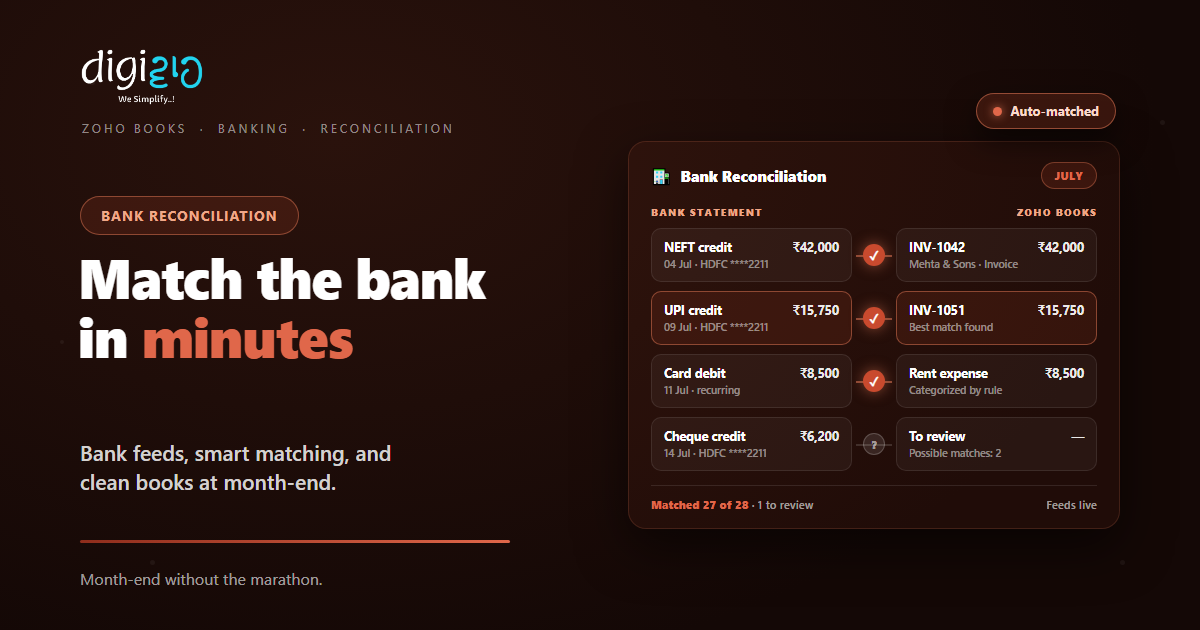
In practice, each bank line gets a “best match” suggestion. So a ₹42,000 NEFT credit lines up with invoice INV-1042 on its own. When several records could fit, you see “possible matches” and pick the right one. In short, you confirm instead of search.
Real payments are messy, and the matching allows for it. For example, one bank credit can cover several invoices — bulk matching handles consolidated and partial payments. Also, deposits and withdrawals can be matched together, which helps when a customer is also your vendor.
Rules: Categorize Once, Reuse Forever
Some transactions repeat every month. Rent goes out, subscriptions renew, and transfers move between accounts. So Zoho Books lets you set transaction rules for them.
A rule reads the bank line and categorizes it automatically. For example: any debit with “OFFICE RENT” in the description becomes a rent expense. Then it happens every month without a click. As a result, the queue you review holds only the genuinely new items.
Rules pair nicely with automated billing too. If you send recurring invoices, the incoming payments match against them cleanly, cycle after cycle.
The Clean-Up Toolkit
Real statements carry noise. So Zoho Books includes tools for the edge cases that used to eat your evening.
Duplicate Detection
Duplicate entries are caught and removed automatically. So one payment never counts twice.
Fee & Discount Adjustments
A payment short by a bank fee or an early-payment discount is adjusted, not stuck.
Attach the Proof
Statements, cheque copies, and receipts attach to the records. So the audit trail stays complete.
Role-Based Access
Banking data is sensitive. Access controls decide who can see and touch the bank screens.
Finally, reconciliation reports pull it together. Filter them by date or account, and you have proof of clean books — for the auditor, the CA, or the bank manager.
Manual Matching vs Zoho Books
The task is the same either way. But the hours and the error rate are not. So here is the honest comparison.
| Step | Manual Matching | Zoho Books |
|---|---|---|
| Getting the statement | Download and copy-paste | Feeds arrive on their own |
| Finding the match | Scan rows line by line | Best match suggested |
| Repeat charges | Categorized by hand, monthly | Rules handle them forever |
| Duplicates | Spotted if you’re lucky | Detected automatically |
| Part payments & fees | Awkward workarounds | Bulk match and adjust |
| Proof for the auditor | Rebuild it in a sheet | Reconciliation reports |
So the software does the ticking, and you do the judging. That is the right split of labour.
How to Reconcile in Zoho Books
Here is the working rhythm, from first setup to a clean month-end.
-
1Bring your accounts in
First, connect your bank and cards for automatic feeds. Or set up email import or file upload. -
2Set rules for the repeats
Next, create rules for rent, subscriptions, and transfers. So the regulars categorize themselves. -
3Review suggested matches
Then work the feed queue. Accept best matches, and pick from possible matches where needed. -
4Handle the stragglers
Now bulk-match consolidated payments, and adjust for bank fees or discounts. Attach proofs. -
5Run the reconciliation report
Finally, confirm the period is clean by account. A Zoho partner can set the whole flow up for you.
If the feed queue is empty and the report is clean, month-end is already done. That is the whole trick.
Reconciliation in Action
The steps sound tidy. So here is what they change in a real office.
The accountant spent the first two days of every month matching the HDFC statement to the books by hand. Some months, a bounced cheque surfaced three weeks late. Then they switched the account to bank feeds in Zoho Books. Now transactions flow in daily, and best matches wait pre-suggested each morning. Rules book the rent and software subscriptions on their own. Meanwhile, a duplicate card charge was flagged the day it happened. As a result, month-end matching takes under an hour, and nothing stays hidden for weeks.
The books did not get simpler. Instead, the checking got continuous. So problems now surface while they are still small.
Frequently Asked Questions
What is bank reconciliation in Zoho Books?
It is matching every transaction on your bank statement to the invoices, expenses, and transfers recorded in your books. Zoho Books fetches statements automatically and suggests matches, so you confirm rather than hunt.
How do bank statements get into Zoho Books?
Three ways: connect your bank and credit cards for automatic feeds, auto-import statements from your email inbox, or upload files. Supported formats include CSV, TSV, XLS, OFX, QIF, CAMT.053, CAMT.054, and PDF (processed via Perfios).
How does transaction matching work?
An intelligent matching algorithm pairs each bank line with your accounting records. You see a best match, or a set of possible matches to choose from. Bulk matching handles one payment covering many invoices, including partial payments.
Can Zoho Books categorize transactions automatically?
Yes. Transaction rules categorize repetitive charges like rent, subscriptions, and transfers without manual entry. Set the rule once, and every matching bank line is booked the same way after that.
What happens with duplicates and bank fees?
Duplicate entries are detected and removed automatically. For payments that arrive short — a bank fee or an early-payment discount — you adjust the balance during matching, so the entry reconciles cleanly.
Who can see the banking data?
Access is role-based, so only the people you authorize can view or work on bank feeds. Reconciliation reports, filterable by date or account, give auditors proof without opening up the bank screens. Banking is part of Zoho Books, alongside invoicing and GST.
Conclusion
In the end, reconciliation is trust, verified. Your books claim a number, and the bank confirms it. So the faster that check runs, the sooner you catch what’s wrong — and the more you can rely on what’s right.
Start with one account. First, switch on its feed. Then add rules for your three most common repeat charges. Next, spend five minutes a day accepting matches. By the second month, the marathon is a coffee break.
Think of last month’s closing. How many hours went into matching — and what did tired eyes miss?
Want bank feeds, rules, and reconciliation set up properly in Zoho Books? Talk to a Zoho Authorized Partner.
