

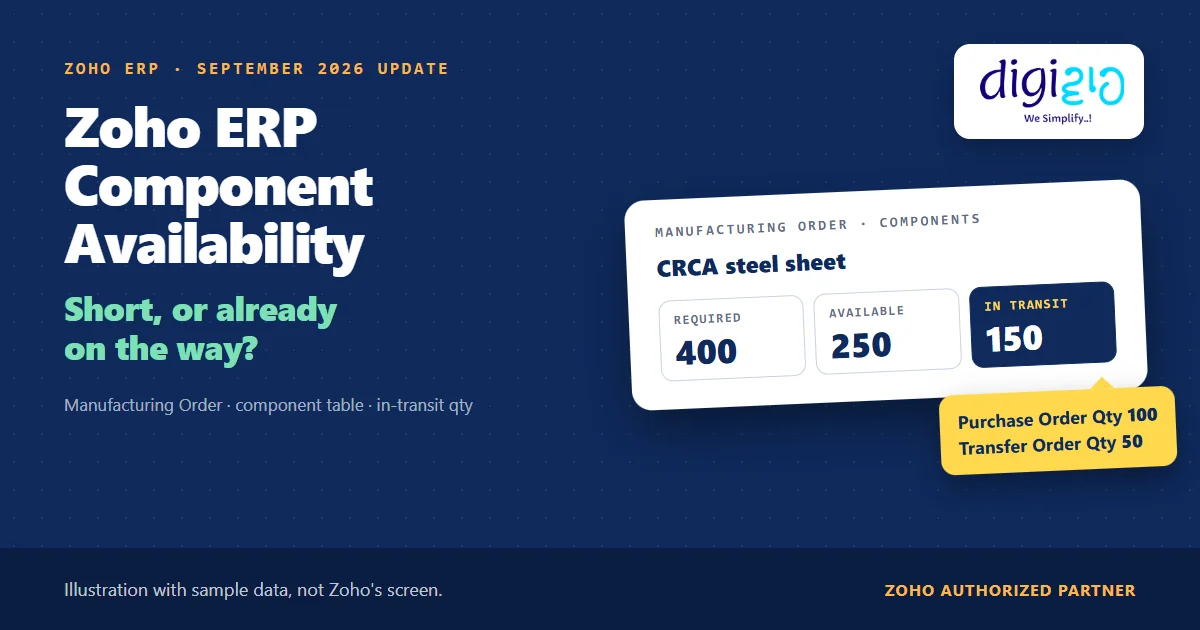
Short answer Zoho ERP component availability tells you, before production starts, whether a Manufacturing Order has the components it needs. The Component Requirements Summary shows the deficit for each component. Since the September 2026 update, the MO’s component table also shows the in-transit quantity, and a tooltip splits it into Purchase Order Qty and Transfer Order Qty. So you can see what is short and what is already on the way.
The store has 250 steel sheets. The Manufacturing Order needs 400. So the planner calls it a shortage and asks purchase to order more.
However, 100 sheets were already on a purchase order, and 50 more were on their way from the second warehouse. In other words, the shortage was really a delivery date. Zoho ERP’s September 2026 update puts that “on the way” number on the Manufacturing Order itself.
Who this guide is for
This guide is for owners, production planners and store heads who run Manufacturing Orders in Zoho ERP. If your team argues about whether a component is short or just late, it is for you. You will learn what component availability means on an MO, what the new in-transit quantity shows, where that stock comes from, how to check it step by step, and what Zoho has not documented yet.
- A new column on the MO. Since September 2026, the Manufacturing Order component table shows the total in-transit quantity for each component.
- Two sources, one number. With the Transfer Orders module on, in-transit counts purchase orders and transfer orders. With it off, it counts purchase orders only.
- A tooltip splits it. Hover over the in-transit quantity to see Purchase Order Qty and Transfer Order Qty separately.
- The deficit comes from a report. The Component Requirements Summary uses “Deficit = Required Quantity − Available Stock” for each MO.
- In transit is not in stock. Zoho consumes components when the MO moves to In Progress, so stock still on the road cannot feed that step.
- What does Zoho ERP component availability mean?
- What the September 2026 update adds
- Where in-transit stock comes from
- The Component Requirements Summary
- How to check it, step by step
- A worked example: 400 steel sheets
- Shortage, or just late?
- What Zoho has not documented yet
- Frequently asked questions
What does Zoho ERP component availability mean?
A Manufacturing Order (MO) makes a finished item from components listed in its bill of materials. Zoho ERP’s Create Manufacturing Order help says that once you enter the Quantity to Produce, “the component quantities and operation time will be calculated in their respective tabs below.”
Component availability is the question that follows: do you have those quantities at the production location? Zoho’s help warns what happens if you don’t: “If the required components are not available in the selected location, the accounting stock for those items will become negative in the selected location.”
It also names the two fixes: “you can either create a transfer order from another location or raise a purchase order to avail the stock.” So Zoho ERP component availability is not one number. Instead, it is stock on hand plus what you have already ordered or moved. For how a BOM sets those quantities, read our guide to BOM in ERP.
What the September 2026 update adds to Zoho ERP component availability
The Zoho ERP product updates for September 2026 list it under Manufacturing Orders as “In-Transit Quantity Breakdown & Tooltip”: “The Manufacturing Order component table now displays the total in-transit quantity based on the enabled transaction types.”
Then the note explains the two cases: “When the Transfer Orders module is enabled, the in-transit quantity includes quantities from both purchase orders and transfer orders. When it is disabled, only the purchase order quantity is included.” Finally: “You can hover over the in-transit quantity to view a tooltip with a detailed breakdown of the Purchase Order Qty and Transfer Order Qty.” The note carries no plan limit and no Early Access label.
| Your setup | In-transit quantity on the MO counts | Tooltip shows |
|---|---|---|
| Transfer Orders module enabled | Purchase orders + transfer orders | Purchase Order Qty and Transfer Order Qty |
| Transfer Orders module disabled | Purchase orders only | Purchase Order Qty |
| Before September 2026 | No in-transit breakdown on the MO | None |
Where in-transit stock comes from: purchase orders and transfer orders
Zoho ERP has two ways for stock to be “on the way” to your plant. First, a vendor ships against a purchase order. The Purchase Order Operations help says that when you convert a PO to a purchase receive, you can “select Save as In Transit if the items are in transit.”
Second, your own warehouse sends stock. The Create Transfer Order help says Initiate Transfer starts “a transfer and receive it later. The transfer order’s status will be set as In Transit, and the stock receipt has to be done manually.”
So the new MO number brings both roads into one place. For the purchase side, read our guide to purchase orders in ERP. For checks when transferred stock arrives, see Zoho ERP transfer order inspection.
Check Zoho ERP component availability with the Component Requirements Summary
The MO shows what is on the way. The deficit, however, comes from a report. Zoho ERP’s Component Requirements Summary help says it “shows whether the required components for a Manufacturing Order (MO) are available in sufficient quantity or are in deficit.”
The formula is simple: “Deficit = Required Quantity − Available Stock”. A deficit greater than 0 “Indicates insufficient stock and that additional components are required.” A deficit of 0 “Indicates adequate component availability to proceed with production.”
The report also shows “the location from which components will be sourced, the planned and actual start dates of the manufacturing order, and its status.” To open it, go to Reports, choose Manufacturing under Report Category, and select Component Requirements Summary.
How to check Zoho ERP component availability before you call a shortage
The steps below follow Zoho ERP’s Manufacturing Order, Transfer Order and report help, plus the September 2026 update. The help pages do not show the new in-transit column yet, so step 4 uses the update’s own words.
-
Decide whether you use Transfer Orders
First, check whether the Transfer Orders module is on. If it is off, the MO’s in-transit number counts purchase orders only, and stock moving from your own warehouses stays out of it.
-
Create the MO at the right location
Next, create the Manufacturing Order with the item, BOM, Quantity to Produce, Start Date and Location. Zoho calculates the component quantities from the BOM.
-
Run the Component Requirements Summary
Then open Reports, choose Manufacturing, and select Component Requirements Summary. Note every component with a deficit greater than 0.
-
Read the in-transit quantity on the MO
For each short component, look at the in-transit quantity in the MO’s component table. Hover over it to see the Purchase Order Qty and the Transfer Order Qty.
-
Compare Zoho ERP component availability with the gap
If the in-transit quantity covers the deficit, chase the delivery date instead of ordering more. If it does not, raise a purchase order or a transfer order for the rest. Since October 2026, you can raise a Zoho ERP backorder PO from the MO itself.
-
Receive the stock before the MO goes In Progress
Finally, receive the purchase receive or the transfer at the production location. Zoho consumes components “once the status changes to In Progress”, so the stock must be in by then.
A worked example: 400 steel sheets for 200 cabinets
For example, take a fabrication unit that makes steel storage cabinets at its Plant location (sample data). The MO is for 200 cabinets, and the BOM uses 2 CRCA sheets per cabinet.
| Line | What Zoho ERP shows | Quantity |
|---|---|---|
| Required | MO component table: CRCA sheet, 200 cabinets × 2 | 400 sheets |
| Available | Component Requirements Summary: available stock at Plant | 250 sheets |
| Deficit | 400 − 250 | 150 sheets |
| In transit | MO component table, new in-transit column | 150 sheets |
| Tooltip | Purchase Order Qty · Transfer Order Qty | 100 · 50 |
As a result, the deficit and the in-transit quantity match. The planner does not raise a new PO. Instead, they ask the vendor to confirm the date for the 100 sheets, and they ask the second warehouse when it will receive its 50. Then the MO moves to In Progress only after both arrive at Plant.
Does your team order “short” components that are already on the way? We set up Manufacturing Orders, Transfer Orders and the Component Requirements Summary in Zoho ERP, and build a short daily shortage check your planner can run.
Shortage, or just late? Reading Zoho ERP component availability
Zoho gives you two numbers: the deficit from the report and the in-transit quantity on the MO. Zoho does not combine them for you. So here is the simple rule we use with planners when we compare the two:
| What you see | What it means | What to do |
|---|---|---|
| Deficit = 0 | Enough stock at the location | Proceed with the MO |
| Deficit > 0, in transit ≥ deficit | Late, not short | Chase the PO or transfer dates; move the start date if needed |
| Deficit > 0, in transit < deficit | A real shortage | Raise a PO (from the MO, since October 2026) or a transfer order for the rest |
The tooltip matters in the middle row. A transfer from your own warehouse is usually faster to chase than a vendor shipment. So the split tells the planner whom to call first.
The bottom row got easier in October. The Zoho ERP product updates for October 2026 say: “You can now create a purchase order directly from a manufacturing order to procure the components required to fulfill back ordered quantities.” So when the in-transit quantity falls short, the planner can raise a purchase order from the manufacturing order (October 2026 update) instead of retyping the gap in a new PO. However, Zoho’s help does not document yet which fields that PO fills in by itself.
From the implementation floor
Most “shortage” calls we see are timing calls. The stock exists, but it sits on a PO or in another warehouse, and nobody looked. So we ask planners to open the Component Requirements Summary every morning and check the in-transit number before they message purchase. It takes five minutes. It also stops duplicate POs, which tie up cash and fill the store twice.
What Zoho has not documented about Zoho ERP component availability yet
The update is one short paragraph. Based on Zoho ERP’s pages as of November 4, 2026, these points are still open:
- Which PO quantity counts. The update says “purchase orders”. It does not say whether that means quantity ordered but not received, or only purchase receives saved as In Transit.
- Which location. The update does not say whether in-transit counts only stock headed to the MO’s location, or every location.
- The report and in-transit. The Component Requirements Summary formula uses Available Stock. Zoho does not say whether that includes in-transit stock, so treat the two numbers separately.
- The help pages lag behind. The Create Manufacturing Order help does not show the in-transit column or the tooltip yet.
- Negative stock. In-transit stock does not stop negative stock. If you enable “Restrict transaction locking with negative stock” in Transaction Locking, Zoho says “you cannot proceed to create transactions that result in negative stock.”
None of these stop you from using the feature. Rather, they are the questions a Zoho ERP implementation partner should answer in a sandbox, with your own items and locations, before planners rely on them.
Related reading: Zoho ERP material consumption on the MO, Zoho ERP inventory aging after transfers, inventory management in ERP, and every change in the September 2026 update.
Frequently asked questions about Zoho ERP component availability
Where does Zoho ERP show in-transit quantity on a Manufacturing Order?
In the Manufacturing Order component table. Since the September 2026 update, it “displays the total in-transit quantity based on the enabled transaction types.” You can hover over the in-transit quantity to see a tooltip that splits it into Purchase Order Qty and Transfer Order Qty. Zoho’s MO help pages do not show the column yet.
Does Zoho ERP count transfer orders as in transit?
Yes, if the Transfer Orders module is enabled. Zoho’s update says the in-transit quantity “includes quantities from both purchase orders and transfer orders.” When the module is disabled, “only the purchase order quantity is included.” A transfer goes In Transit when you click Initiate Transfer, and you receive it manually later.
How does Zoho ERP calculate a component deficit?
In the Component Requirements Summary report, Zoho uses “Deficit = Required Quantity − Available Stock” for each Manufacturing Order. A deficit greater than 0 means you need more components. A deficit of 0 means you have enough to proceed. Open it from Reports, under the Manufacturing category.
Can I start a Manufacturing Order with stock that is still in transit?
Zoho consumes components “once the status changes to In Progress”, and stock in transit is not yet at your location. Zoho also warns that missing components make “accounting stock for those items” negative there. So receive the purchase receive or the transfer first, then move the MO to In Progress.
Is the in-transit breakdown limited to a Zoho ERP plan?
The September 2026 update gives no plan limit and no Early Access label for the in-transit breakdown. Other items in the same update, such as auto batch numbers, carry their own plan notes. If you are unsure about your plan, check the feature in your own organisation or ask your partner.
What should a planner do when a component shows a deficit?
Compare the deficit with the in-transit quantity on the MO. If in-transit covers it, chase the purchase order or transfer dates instead of ordering again. If not, Zoho’s help suggests the two fixes: “create a transfer order from another location or raise a purchase order to avail the stock.” Since October 2026, you can raise that purchase order directly from the MO.
Conclusion
In short, Zoho ERP component availability is now easier to read. The Component Requirements Summary tells you what is short, and the MO’s in-transit quantity tells you what is already coming, split by purchase orders and transfer orders. The real work is a daily habit: check both numbers before anyone raises a new PO.
So, one question for your next production meeting: how many of last month’s “shortages” were already on the way?
Know a shortage from a late delivery
Digiwah, a Zoho Authorized Partner, sets up Manufacturing Orders, Transfer Orders and component reports in Zoho ERP, and trains your planners to check availability before they order.
Prefer to write? Tell us how you check component shortages today.
