

Short answer Zoho ERP manufacturing cost comes from two parts on each manufacturing order: components and operations. A cost template on each work centre type sets the operation rate, Fixed or Hourly, while job cards record the time. Then, once you complete the order, the Cost Overview shows estimated and actual cost side by side, so you can see which operation cost more.
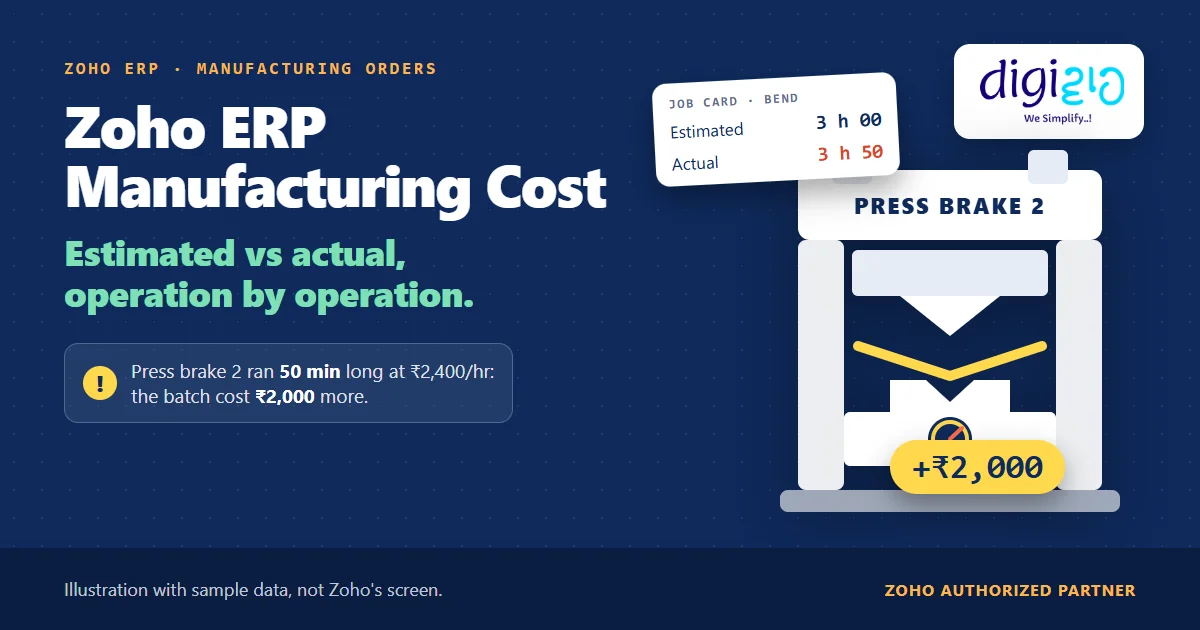
A batch of 2,000 steel mounting plates closed ₹2,000 over its estimate. The material came in on plan, but one press brake didn’t.
Most plants find this out at month end, as one number in a profit and loss line nobody can explain. Instead, Zoho ERP can show it per batch, operation by operation, as long as the setup behind it is right.
Who this guide is for
This guide is for owners, plant heads and costing teams in manufacturing businesses who run, or plan to run, production in Zoho ERP. Also, you will learn how Zoho ERP builds the cost of a manufacturing order, what a cost template does, how job cards turn floor time into rupees, where to compare estimated and actual cost, and what Zoho does not document yet.
- Two cost sections. First, Zoho ERP’s Cost Overview splits a manufacturing order into Components Cost Details and Operations Cost Details.
- Estimated first, actual later. Zoho calculates estimated cost from planned quantities and durations, but it calculates actual cost only after you complete the order.
- Cost templates set the rate. Each cost line is either Fixed (a constant cost per job) or Hourly (based on time spent). Also, the template sits on a work centre type.
- Job cards record the time. Operators use Start, Pause and Stop, or else a manual start and end time. So a machine that runs long shows up in the operation cost.
- Reports roll it up. Finally, the Manufacturing Order Summary, Delayed Job Cards and Item Cost Analysis reports compare plan and actual across orders.
How does Zoho ERP calculate manufacturing cost?
In Zoho ERP, cost lives on the manufacturing order (MO). First, the MO names the Item to Produce, the Bill of Materials and the Quantity to Produce. Then Zoho works out the component quantities and the operation time from that quantity.
As a result, those two numbers drive the estimate. The Create Manufacturing Order help page says: “Estimated costs are calculated based on the planned component quantities and operation durations.” After that, the actual side waits for the end of the run: “The Actual Cost is calculated only after the manufacturing order is completed.”
| Cost section | Estimated from | Actual from |
|---|---|---|
| Components Cost Details | Planned component quantities from the BOM and the MO quantity | Components consumed in the MO |
| Operations Cost Details | Planned operation durations and the cost template rates | Time recorded on the job cards |
So the order moves through Draft, Confirmed, Released, In Progress and Completed. Zoho consumes the components when the order goes In Progress. However, the Cost Overview fills in the actual column only when the order reaches Completed.
What is a cost template in Zoho ERP manufacturing cost?
In other words, a cost template is the rate card for a kind of machine. The Cost Templates help page says it “defines how the manufacturing cost of an item is calculated by grouping different cost components.” Zoho also applies the template by itself while jobs are in progress.
Each template holds one or more cost lines. For each line, you enter a Cost Name, a Cost Type, a Rate and a Cost Account. Then you choose between two cost types:
| Cost Type | Zoho’s definition | Example (sample data) |
|---|---|---|
| Hourly | “Cost calculated based on time spent.” | Press brake power and tooling at ₹2,400 per hour |
| Fixed | “A constant cost applied per job.” | A die setup charge for each press brake job |
However, the template does not sit on the machine directly. Instead, it sits on a work centre type, and one type can serve many work centres. Each work centre then links to a type. If one press brake costs more to run than its siblings, you can pick a different cost template on that work centre “instead of the work center type’s cost template.” Finally, each operation in your BOM names its work centre type, and that is how the rate reaches the operation.
How job cards turn floor time into Zoho ERP manufacturing cost
Still, rates alone don’t make a cost; time does. According to the Job Cards help page, job cards “break down each operation in a manufacturing order into individual jobs and allocate them to work centers automatically, based on availability.”
When you confirm the MO, you click Release Job Cards. Then the operator records the time in one of two ways:
- Timer. Click Start, Pause if the line stops, and “click the Stop button to record the actual duration.”
- Manual entry. Otherwise, click Mark as Completed and enter the Actual Start and End Time.
As a result, an overrun becomes visible. Zoho says you can view “completed job cards actual time taken exceeds the estimated time” in the MO details. So, with an Hourly template, every extra minute on that job card adds to the actual operation cost.
That is also why the timer matters more than the template. For instance, if operators press Stop at the end of the shift instead of the end of the job, the cost is wrong, and Zoho ERP will report it faithfully.
Since the October 2026 update, staff can also “update the produced quantity for each job card from the Job Cards and Shop Floor modules”, and the new Shopfloor mobile app lets them open their assigned job cards on a phone. So the operator can stop the timer and record output at the machine. For the details, see our guides to the Zoho ERP job card and the Zoho ERP Shopfloor app.
A worked example: the press brake that ran long
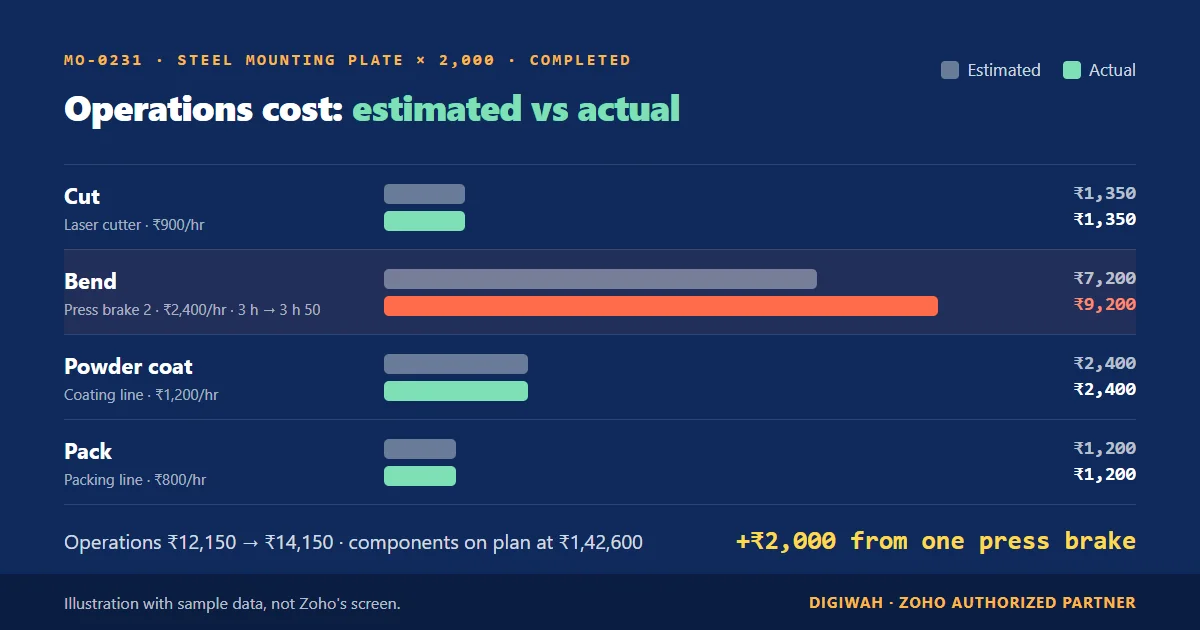
For example, take a sheet-metal unit (sample data). It raises MO-0231 for 2,000 Steel Mounting Plates. Also, the BOM has four operations, each on a work centre with an Hourly cost template.
| Operation | Work centre | Rate | Estimated | Actual | Est. ₹ | Actual ₹ |
|---|---|---|---|---|---|---|
| Cut | Laser cutter | ₹900/hr | 1 h 30 min | 1 h 30 min | 1,350 | 1,350 |
| Bend | Press brake 2 | ₹2,400/hr | 3 h 00 min | 3 h 50 min | 7,200 | 9,200 |
| Powder coat | Coating line | ₹1,200/hr | 2 h 00 min | 2 h 00 min | 2,400 | 2,400 |
| Pack | Packing line | ₹800/hr | 1 h 30 min | 1 h 30 min | 1,200 | 1,200 |
| Operations | 12,150 | 14,150 | ||||
| Components | 1,42,600 | 1,42,600 | ||||
| Total | 1,54,750 | 1,56,750 |
The steel sheet, fasteners, powder and cartons came in exactly on plan. However, Press brake 2 ran 50 minutes longer than planned. Because the rate is ₹2,400 an hour, those 50 minutes cost ₹2,000.
Actual over estimated cost for the batch, all of it from one operation (Bend, Press brake 2)
Our arithmetic · sample data
Extra cost per plate: ₹78.38 actual against ₹77.38 estimated, over 2,000 plates
Our arithmetic · sample data
On the whole batch, that is only about 1.3%. On operations alone, though, it is 16.5%, and it points at one machine. So the question for the plant head is no longer “why is margin down?” but “why does Press brake 2 run long?”
Want to see which machine on your line runs long? We set up cost templates for each work centre type in Zoho ERP, map your BOM operations to them, and train the floor to start and stop job cards on time.
How to set up Zoho ERP manufacturing cost, step by step
Below, the steps follow Zoho ERP’s help pages for cost templates, work centres, operations, manufacturing orders and job cards.
-
Create a cost template for each kind of machine
First, click the Gear icon, scroll to Module Settings, and under Manufacturing click Cost Templates. Then click Add Cost Template, enter a Name, and add each Cost Name with its Cost Type, Rate and Cost Account.
-
Attach the template to a work centre type
Next, under Manufacturing, open Work Centre Types and click Add Work Centre Type. Then enter a Name and Description, and select the Cost Template.
-
Create the work centres
Then, under Work Centers, click New, enter the Name and choose the Work Center Type. Pick a different Cost Template only if this machine costs more or less than its type. Also, enter Setup Time, Cleanup Time and capacity.
-
Link operations to work centre types
After that, under Operations, create each step, such as Cut or Bend, and select its Work Centre Type. Later, you pick these operations when you build the BOM.
-
Run the order and record time on job cards
Now create the MO, confirm it, and click Release Job Cards. After that, operators click Start, Pause and Stop on each job, or enter the Actual Start and End Time by hand.
-
Check Zoho ERP manufacturing cost in the Cost Overview
Finally, complete the MO. Then open it, click Cost Overview, and expand each line under Components Cost Details and Operations Cost Details to see the calculation.
Which reports compare Zoho ERP manufacturing cost across orders?
The Cost Overview answers the question for one batch. But for a week or a month, three reports under Reports, then Manufacturing, do the same across orders:
| Report | What it shows | Use it to ask |
|---|---|---|
| Manufacturing Order Summary | Estimated and actual operation cost, actual component cost, estimated and actual duration, per MO | Which batches went over? |
| Delayed Job Cards | Planned and actual start, end and duration per job card, with the deviation | Which operation runs long? |
| Item Cost Analysis | Average operation cost and average component cost per unit, across all MOs for an item | What does one unit really cost us? |
For example, in our example the Delayed Job Cards report would show the Bend job card with a Total Time Deviation of 50 minutes. Then, over a month, the same report tells you whether Press brake 2 runs long once or every week.
From the implementation floor
The cost template is the easy part. Instead, in our setups, the real work is getting operators to press Stop when the job ends, not when the shift ends. So we start with one template per work centre type, keep the rates simple, and check the Delayed Job Cards report every week for the first month. Only when the times are honest do the cost numbers start to mean something.
What Zoho has not documented about manufacturing cost yet
Zoho ERP’s costing pages are clear about the chain. Still, based on its help pages as of November 21, 2026, these points are open:
- No running cost. Actual cost appears only after the MO reaches Completed, so you can’t watch a batch’s cost build up mid-shift.
- No labour or overhead rows. The Cost Overview has components and operations only. So labour or overhead goes in as a cost line inside a template, not as its own section.
- Staff rates. When you assign shopfloor staff, the job card page says Zoho calculates cost “based on the duration”. But Zoho documents no rate per staff member.
- Fixed cost per job. A Fixed cost applies “per job”. However, Zoho does not say how it counts when one operation splits into several job cards.
- Component price. Similarly, the Cost Overview shows “the price of the item”, but Zoho does not say which price that is.
- Actual consumption. Since the September 2026 update, you can record the actual quantity of each component consumed. But Zoho does not yet say whether that changes the actual component cost. See our guide to Zoho ERP material consumption.
- Produced quantity. Likewise, since October 2026 staff can update the produced quantity on each job card. However, Zoho does not say whether that quantity changes the actual cost in the Cost Overview.
None of this stops you from costing batches today. Rather, these are points to test with your own BOMs before finance relies on the numbers, which is the work a Zoho ERP implementation partner should do with you.
Related reading: BOM in ERP, Zoho ERP quality inspection, Zoho ERP batch tracking, and inventory management in ERP.
Frequently asked questions about Zoho ERP manufacturing cost
How does Zoho ERP calculate manufacturing cost?
Zoho ERP costs each manufacturing order in two sections, components and operations. First, it estimates cost from the planned component quantities and operation durations. Then, once you complete the order, it calculates the actual cost and shows both in the Cost Overview, so you can compare planned and incurred cost line by line.
When does Zoho ERP show the actual cost of a manufacturing order?
Only after you complete the order. Zoho’s help says it calculates the actual cost only at that point. Until then, the Cost Overview shows the estimate. So you can’t track a batch’s actual cost while it is still running, only once it closes.
What is the difference between Fixed and Hourly cost types?
Both belong to a Zoho ERP cost template. Fixed charges a constant cost per job, whatever the job’s duration. Hourly, by contrast, charges for the time spent, so a job that runs longer costs more. For example, a press brake’s running cost suits Hourly, while a die setup charge for each job suits Fixed.
Where do I set up cost templates in Zoho ERP?
Click the Gear icon, scroll to Module Settings, and under Manufacturing click Cost Templates. Then click Add Cost Template and enter the cost lines. Next, attach the template to a work centre type. As a result, every work centre of that type uses it, unless you pick a different template on the work centre itself.
Does Zoho ERP show labour and overhead cost separately?
Not as separate sections. Instead, the Cost Overview splits cost into Components Cost Details and Operations Cost Details. Still, you can capture labour or overhead as named cost lines inside a cost template, with their own rate and cost account, so they flow into the operation cost of each job.
Which Zoho ERP report shows cost overruns across batches?
Use the Manufacturing Order Summary report. First, it lists estimated and actual operation cost, actual component cost, and estimated and actual duration for each MO. Then, to find the operation behind an overrun, open the Delayed Job Cards report, which shows the planned and actual duration of each job card.
Conclusion
In short, Zoho ERP manufacturing cost is only as good as two habits: a fair rate on each work centre type, and a job card stopped when the job really ends. When you get those right, every completed batch tells you where the money went, operation by operation, instead of leaving it to a month-end guess.
So, one question for your next production review: which machine on your line runs long most often?
Know what every batch really cost
Digiwah, a Zoho Authorized Partner, sets up cost templates, work centres and job cards in Zoho ERP, and trains your floor so the cost of every manufacturing order is one you can trust.
Prefer to write? Tell us how your line runs today.
