

Short answer Zoho ERP for manufacturing runs most of a plant natively: Purchase Receive, quality checks, putaway, batches, manufacturing orders, job cards, work centers, the Shopfloor view and app, picking, packing, shipments, invoices and e-Way Bills. Proof of delivery is native too, in Delivery Runs (Early Access). However, Zoho ERP’s help docs do not cover gate entry, gate exit or a batch manufacturing record, so those need a custom build.
“Can Zoho run the whole plant?” In fact, owners ask us this on almost every first call.
However, the honest answer is a map, not a yes or no. So we walk the plant from the gate to the customer, stop at each station, and mark what Zoho ERP does on its own and what we have to build. In other words, this guide is that map, written out, with Zoho’s own words behind every native item.
Who this guide is for
This guide is for owners, plant heads and finance leads of a manufacturing unit who are weighing Zoho ERP for the whole plant, not just accounts. You will learn what Zoho ERP covers at each of nine stations, from the truck at the gate to proof of delivery, where the documented gaps are, and how to map your own plant before you commit. For example, we follow one truckload of raw material through a plant that moulds plastic crates, but the stations are the same in most plants.
- The core is native. Purchase Receive, quality inspections, putaway, batches, manufacturing orders, job cards and work centers all have Zoho ERP help pages.
- Dispatch is native too: picklists, packages, shipments, invoices and e-Way Bills generated from Zoho ERP.
- The shop floor has a native view and app. Shopfloor shows every job by work center, with planned and actual time, and since October 2026 the Shopfloor mobile app is on the Google Play Store and App Store.
- Proof of delivery is native but early. Delivery Runs take a photo or an OTP before a shipment is marked delivered; the feature is in Early Access.
- The gaps sit at the edges: gate entry, gate exit and the batch manufacturing record (BMR) are not in Zoho ERP’s help docs.
- The map: nine stations, gate to delivery
- Gate entry, Purchase Receive and inward QC
- Putaway, bins and batches
- Production orders, job cards and the Shopfloor
- Dispatch and delivery
- A worked example: one truckload of raw material
- How to map your own plant
- What Zoho ERP does not cover
- Frequently asked questions
What does Zoho ERP for manufacturing cover, gate to delivery?
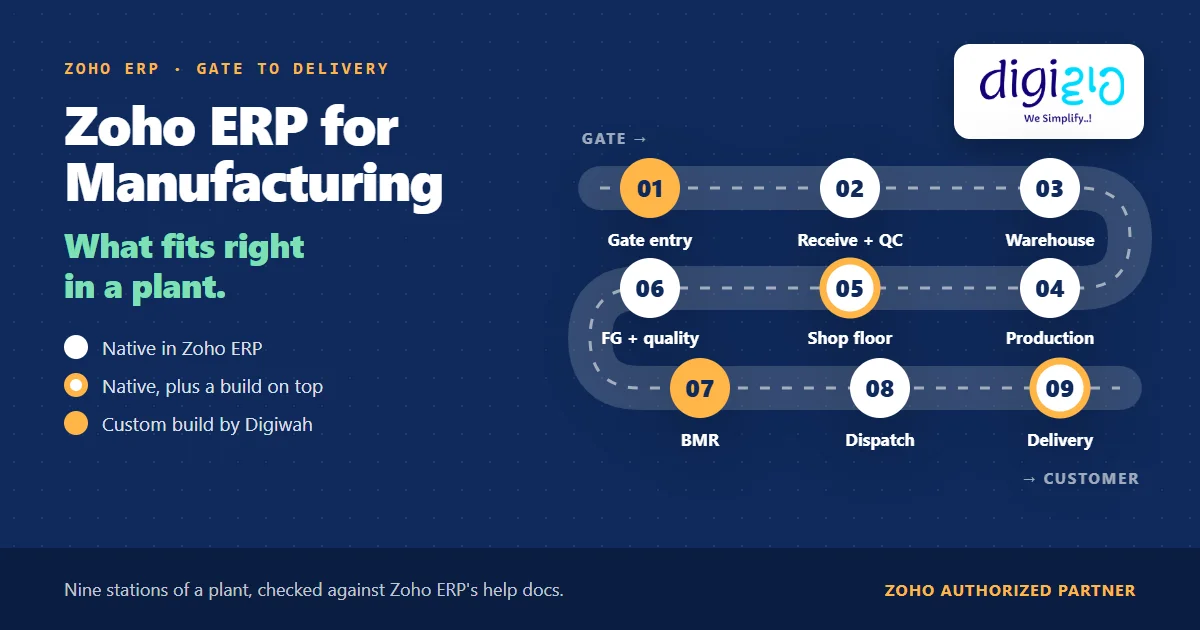
On the map in our LinkedIn post, four of the nine stations were custom builds: gate entry, a shop-floor app, the BMR and proof of delivery. For this guide, we re-read Zoho ERP’s help pages and its October 2026 update on November 21, 2026. As a result, two of those four turn out to have native pieces you should try first: the Shopfloor view and app, and proof of delivery in Delivery Runs. So here is the updated map: two stations fully built, two native with a build on top, five native.
| # | Station | What happens there | In Zoho ERP |
|---|---|---|---|
| 01 | Gate entry | Truck, driver and material logged at the gate | Not in the help docs: our build |
| 02 | Purchase Receive and inward QC | Goods received against the PO, then inspected | Native |
| 03 | Warehouse | Putaway into bins, batch numbers, barcode labels | Native |
| 04 | Production | Manufacturing order, BOM, job cards, work centers | Native |
| 05 | Shop floor | Jobs by work center, planned vs actual time | Native Shopfloor view and mobile app, plus our operator screen where needed |
| 06 | Finished goods and quality | Final inspection, finished-goods batch into stock | Native |
| 07 | BMR | The batch manufacturing record document | Not in the help docs: our build, from native data |
| 08 | Dispatch | Picklist, package, shipment, invoice, e-Way Bill | Native |
| 09 | Delivery | Proof of delivery, gate exit | POD native (Early Access); gate exit is our build |
In short, the middle of the plant runs on Zoho ERP, and the gaps sit at the two gates and in one compliance document. Next, the sections below take each station in turn.
Inward: what Zoho ERP for manufacturing does at the gate and the receipt
01 Gate entry
Zoho ERP’s help navigation has no gate entry, gate pass or weighbridge page. So the truck register at the gate stays on paper unless you add something. Instead, we build a small gate app: security logs the vehicle number, driver, material and a photo, and the entry links to the purchase order the truck is carrying.
02 Purchase Receive and inward QC
Next, the store records the receipt. Zoho ERP calls this a Purchase Receive (the GRN step, in plant language): “a record that captures the details of goods received in your warehouse from a vendor against a purchase order.” It moves from draft to In Transit to Received, and later converts to a bill. Also, you can print barcode labels while you receive, and since the October 2026 update a Purchase Receive can carry the tracking number and tracking URL of the incoming shipment.
After the receipt, quality takes over. Zoho’s Quality module page says it “comes into effect after Job Cards are completed for a Manufacturing Order or when a purchase receive is created for the purchased item.” As a result, if the item has an active Quality Rule, Zoho ERP creates the inspection from your Quality Template. Our Zoho ERP quality inspection guide covers that setup, and the receive is also what three-way matching checks a bill against. For the purchase side before the truck arrives, see purchase orders in ERP.
In the store: putaway, bins and batches in Zoho ERP for manufacturing
03 Warehouse
Once the goods pass, they then move into storage. In Zoho’s words, putaway is “transferring received goods from the Receiving Area to their assigned storage bins within the warehouse.” Besides receipts, you can also create a putaway after transfer orders or sales returns.
At the same time, batch tracking keeps the lot number on the stock: it “enables tracking of items in batches using batch or lot numbers for improved inventory control and traceability.” Our Zoho ERP batch tracking guide shows how the batch then flows into production. If stock later moves between two of your locations, a transfer order inspection can check it again at the receiving end.
Production in Zoho ERP for manufacturing: MO, job cards and the Shopfloor
04 Production
First, the manufacturing order (MO) is the centre of the plant. It “defines what item is being manufactured, the quantity, the bill of materials (BOM) required, and the production timeline.” Then it moves through Draft, Confirmed, Released, In Progress and Completed. At Released, Zoho ERP turns every operation into a job card, and components leave stock once the MO is In Progress. If the store is short of a component, the October 2026 update lets you “create a purchase order directly from a manufacturing order to procure the components required to fulfill back ordered quantities”; our Zoho ERP backorder guide walks through it.
Job cards also bring in work centers. Zoho ERP will “break down each operation in a manufacturing order into individual jobs and allocate them to work centers automatically, based on availability.” In addition, each work center holds its own setup time, cleanup time and capacity. For the BOM side, see BOM in ERP.
05 Shop floor
At first, many plants assume they need a separate shop-floor app. However, Zoho ERP has a native Shopfloor view: it “shows all jobs assigned to each work center, including planned and actual time and the job status.” From there, a supervisor can open a job card and record its duration, and you can assign shopfloor staff to each job. See Zoho’s Shopfloor help page.
Since October 2026, there is also a phone app. In Zoho’s words, the Shopfloor – Zoho ERP mobile app is “now available on the Google Play Store and App Store, enabling shop floor staff to access assigned job cards, manage manufacturing operations, and perform quality inspections directly from their mobile devices.” The same update lets you “update the produced quantity for each job card from the Job Cards and Shop Floor modules.” Our guides to the Zoho ERP Shopfloor app and the Zoho ERP job card cover the setup.
So we now start with Shopfloor and its app, and only build an operator screen when the plant needs something Zoho does not document, such as scrap entry at the machine.
06 Finished goods and quality
After the job cards are done, the final inspection runs. Zoho ERP is strict here: “Only after all required inspections are successfully validated can the Manufacturing Order be marked as completed.” After that, the finished item goes into inventory with its own batch.
07 BMR
Many plants, however, must keep a batch manufacturing record on paper or PDF for every batch, for audits or for their customers. We found no BMR or batch record in Zoho ERP’s help docs or its features page. Still, the data a BMR needs already sits in Zoho ERP: the MO, the component batches, job card times and the inspection results. So we build the BMR as a document that pulls from those records, instead of a second register.
Outward: dispatch and delivery in Zoho ERP for manufacturing
08 Dispatch
By contrast, dispatch is fully native. First, a picklist tells the picker “the required items, quantities, and bin locations before shipment.” Then a package records what goes into each box, with batch and bin tracking. After that, a shipment records “the details of goods dispatched from your organization to a customer after they are packed.” Finally, the invoice goes out, and Zoho ERP can create e-Way Bills for invoices, bills of supply, credit notes and delivery challans. According to its e-Way Bills help, you can generate them directly from Zoho ERP, with transaction details pre-filled.
Two October 2026 changes touch this station. First, you can now “create Delivery Challans directly from shipments generated through Sales Orders”; see our Zoho ERP delivery challan guide. Second, carrier shipments are “now created in Draft status and move to Shipped only after successful confirmation from the carrier.”
09 Delivery
For years, proof of delivery was a paper slip that came back days later. Now Zoho ERP has Delivery Runs, which group shipments for one delivery agent on one date. In Zoho’s words: “If your distribution admin has enabled Proof of Delivery (POD), you must capture the required proof, such as a photo or OTP verification, before marking a shipment as Delivered.” Meanwhile, the agent works from the Beat – Zoho ERP Android app, which takes up to 5 photos from the camera or sends a code to the customer’s contact. Our Zoho ERP proof of delivery guide covers the setup.
Two cautions, though. Delivery Runs are in Early Access, so you write to Zoho to enable them. Also, the truck leaving your own gate is a gate exit, not a delivery, so it goes into the same gate app as station 01.
A worked example: one truckload of raw material, gate to delivery
To see it end to end, take a plant that moulds plastic crates and follow one truckload of polymer granules through all nine stations (sample data).
| # | What happens | Record |
|---|---|---|
| 01 | Security logs the truck, driver and a photo | Gate entry (our app), linked to the PO |
| 02 | The store receives 400 bags of 25 kg granules; the quality template checks moisture (max 0.20%) and colour against the master sample: 0.12% and a match, passed | Purchase Receive PR-1124-07, inspection Passed |
| 03 | The granules go to bin RM-A-02 under batch PP-1124-A | Putaway |
| 04 | Planning raises an MO for 2,000 crates; the 500 labels the store is short of go on a PO raised from the MO | MO, BOM, job cards released |
| 05 | Moulding, then trimming and assembly, each at its own work center; staff log the produced quantity on each job card | Shopfloor (web or app): planned vs actual time |
| 06 | The final inspection passes; the MO completes | Finished-goods batch CRT-1124-A in stock |
| 07 | The batch record prints from the MO, batches and results | BMR (our build) |
| 08 | A distributor’s order is picked, packed, shipped and invoiced | Picklist, package, shipment, invoice, e-Way Bill |
| 09 | The van drops at 12 dealers; each drop gets a photo or OTP | Delivery Run with POD; gate exit in our app |
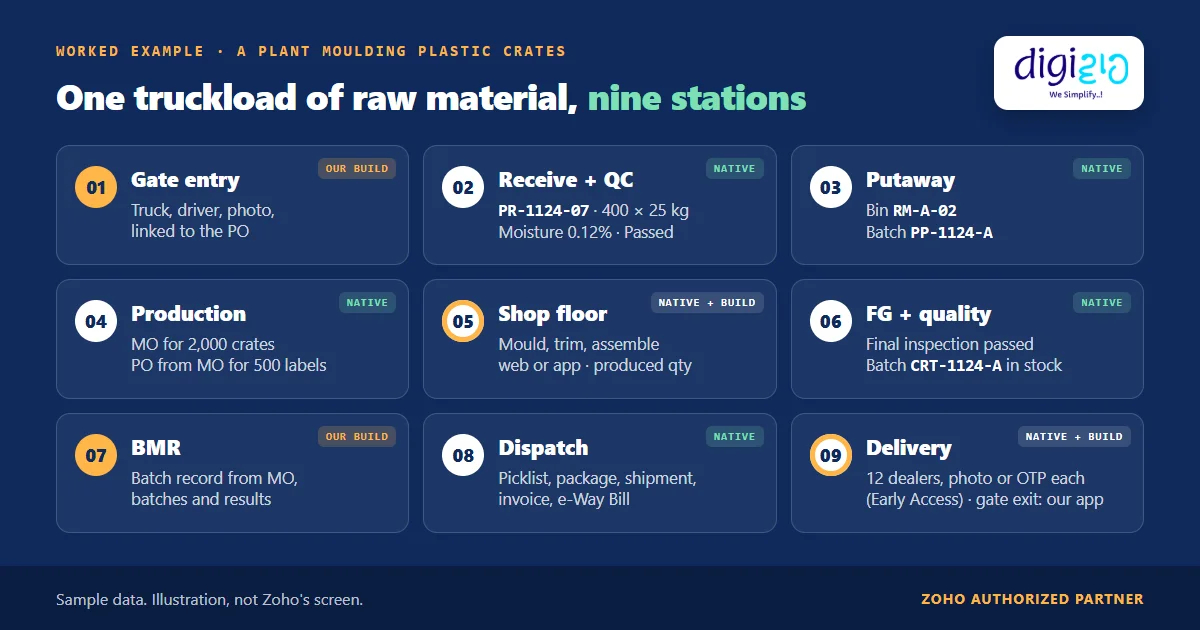
Now notice where the paper would have been. Without the builds, the truck’s arrival, the BMR and the van leaving the gate would each sit in a register. With them, an auditor can start from one dealer’s delivery photo and walk back to the truck that brought the granules.
Want this map drawn for your plant? We walk your floor from gate to delivery, mark which stations Zoho ERP covers natively and which need a build, and tell you what a rollout would involve.
How to map your own plant before you buy
In practice, you can draw a first version of this map yourself in an afternoon. For instance, here is the method we use.
-
Walk one load through the plant
First, follow one truck of your main raw material from the gate to the customer. Then write down every place someone writes something down.
-
Name each station and its register
Next, list each station with the paper, sheet or app it uses today, and who fills it in.
-
Check Zoho ERP for manufacturing docs per station
Then, for each station, look for a Zoho ERP help page that describes it. If there is one, mark it native and note any Early Access label.
-
Mark the gaps
After that, mark the stations with no help page as builds. Usually these are the gate, the BMR and any plant-specific form.
-
Try native first, then build
Finally, test the native module with your own data before you build anything. A build should fill a gap, not replace a native screen your team never tried.
From the implementation floor
In our experience, the core rarely causes trouble on a rollout. Instead, the edges do: the gate register, the BMR file and the delivery slip, because each one sits with a team that never logs into the ERP. That is why we map the gate and the delivery first. Also, we re-check Zoho’s help pages before every build, because Zoho keeps adding native pieces, and a build you don’t need is a build you have to maintain.
What Zoho ERP for manufacturing does not cover (yet)
Based on Zoho ERP’s help pages and its October 2026 update as of November 21, 2026, these points need a build or a test:
- Gate entry and gate exit. No gate or weighbridge page exists in the help docs, so plan a custom app.
- The BMR. There is no batch manufacturing record. Instead, the manufacturing reports Zoho lists are BOM Efficiency, Component Requirements Summary, Item Cost Analysis, MO Summary, Delayed Job Cards and Daily Production Summary.
- Scrap at the machine. The Job Cards and Shopfloor pages do not document scrap entry, so test it before you promise it to supervisors.
- Proof of delivery maturity. Delivery Runs are Early Access, and the help page documents the Android app only.
- Plans. We have not listed which Zoho ERP plan includes which module. So check the plan before you design around a feature.
Even so, none of these stop a plant from running on Zoho ERP. Rather, they decide the size of the build around it, which is the first thing a Zoho ERP implementation partner should tell you. Related reading: inventory management in ERP.
Frequently asked questions about Zoho ERP for manufacturing
Can Zoho ERP for manufacturing run a whole plant?
Mostly, yes. For example, Zoho ERP documents the Purchase Receive, quality inspections, putaway, batches, manufacturing orders, job cards, work centers, the Shopfloor view, picking, packing, shipments, invoices and e-Way Bills. Gate entry, gate exit and a batch manufacturing record are not in its help docs, so those need a custom build around Zoho ERP.
Does Zoho ERP have a gate entry module?
Not according to its help docs as of November 21, 2026. The help navigation has no gate entry, gate pass or weighbridge page. As a result, the first record Zoho ERP keeps is the Purchase Receive in the store. Therefore, to log trucks at the gate, plants use a custom app linked to the purchase order.
Does Zoho ERP have a shop-floor app?
Yes. Inside Manufacturing Orders, the Shopfloor view shows all jobs assigned to each work center, with planned and actual time and the job status. In addition, since October 2026 the Shopfloor – Zoho ERP mobile app is on the Google Play Store and App Store, so shop floor staff can open their job cards and perform quality inspections from a phone.
Can Zoho ERP produce a batch manufacturing record (BMR)?
Zoho ERP’s help docs and features page do not mention a BMR. However, the data a BMR needs is native: the manufacturing order, component batches, job card times and quality inspection results. So a BMR is usually a custom document that pulls from those records.
Does Zoho ERP capture proof of delivery?
Yes, through Delivery Runs, which are in Early Access. If the distribution admin enables Proof of Delivery, the delivery agent must capture a photo or an OTP verification before marking a shipment as delivered. The help page documents this in the Beat – Zoho ERP Android app.
What does Digiwah build around Zoho ERP for manufacturing?
Above all, three things: a gate app for truck entry and exit, a BMR document built from Zoho ERP data, and an operator screen where the Shopfloor view and app do not cover a plant’s needs. We build them as custom apps, often on Zoho Creator, and link them to Zoho ERP records.
Conclusion
In short, Zoho ERP for manufacturing covers far more of the plant than most owners expect: from the Purchase Receive to proof of delivery, the core is native. Instead, the real decision is the edges, and those are small, known builds. So map your plant before anyone quotes you a rollout.
So, the question from our LinkedIn post: can Zoho run your whole plant? Draw the map, and you will know.
Get your plant mapped, gate to delivery
Digiwah, a Zoho Authorized Partner, walks your floor station by station, shows you what Zoho ERP covers natively and what needs a build, and then sets up both.
Prefer to write? Send us how your plant works today.
